Google Meet

5,000,000,000+
Installs
Google LLC
Developer
-
Social
Category
-
Rated for 3+
Content Rating
-
apps-help@google.com
Developer Email
-
http://www.google.com/policies/privacy
Privacy Policy
Screenshots



editor reviews
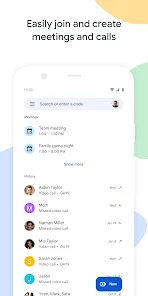
Google Meet is Google's video conferencing app that sits squarely in the communication and productivity category. People mainly use it for work meetings, virtual classrooms, and staying in touch with friends or family through video calls. A normal user might download it because it comes pre-installed on many Android phones or because their work or school uses Google Workspace. The first time you launch the app, the interface looks clean and minimal, with a prominent "New meeting" button and a list of upcoming scheduled calls. There are no annoying ads, and while the app is free to download and use for basic features, Google does offer paid tiers for businesses that need longer meeting durations or more participants.
After you start using it, the hands-on experience feels familiar if you've ever used any video chat app. The onboarding is practically non-existent because the interface is so straightforward: you tap "New meeting" to start an instant call, share a link, or schedule one via Google Calendar. The main actions happen during a call, where buttons along the bottom control microphone, camera, screen sharing, and captions. One common scenario is joining a meeting with a simple code or link, and the app handles the rest. A small practical tip: turning on live captions during a noisy meeting is a lifesaver. The interface stays smooth most of the time, though occasional lag can happen on older phones or weak connections.
After using Google Meet for a while, I think it's best suited for people already using Google services, like Gmail or Calendar integration. Those who heavily rely on Microsoft Teams or Zoom might find Meet lacking in advanced features like breakout rooms or extensive customization. What sets it apart is its tight integration with Google Workspace, making scheduling and joining calls seamless if you're in that ecosystem. I'd keep it installed for work or school purposes, but for personal use, I might uninstall it because other apps like WhatsApp or FaceTime are more casual. It's a solid, no-fuss option for video calls, but not revolutionary.
features
- 📅 Seamless Google Calendar integration lets you start or join meetings directly from calendar events without needing to copy links or dial numbers manually.
- 🎥 Live captions powered by Google's speech recognition are surprisingly accurate and work in multiple languages, making meetings more accessible for everyone.
- 🖥️ Screen sharing with presentation mode allows participants to view your screen while you see their video feeds, which is more natural for teaching or presenting.
- Compared to Zoom, Google Meet lacks breakout rooms, but its integration with Google Slides and Docs makes collaboration more fluid for team projects.
pros
- ✅ No time limit on one-on-one calls: unlike Zoom's 40-minute limit, you can talk for hours with just two people for free.
- ✅ Noise cancellation works well even on low-end devices, filtering out background noises like typing or street sounds better than many competitors.
- ✅ It's entirely web-based, so no heavy download is needed for desktop use, unlike Microsoft Teams which requires a full client.
cons
- ❌ Group calls are capped at 60 minutes for free users, which feels restrictive compared to Zoom's 40-minute limit but still annoying for longer meetings.
- ❌ No virtual backgrounds are available on mobile unless you have a Pixel phone, while Zoom and Teams offer this feature across all devices.
- ❌ The mobile app drains battery faster than FaceTime or WhatsApp calls, especially during longer meetings with screen sharing active.
Recommended Apps
![]()
Phone Tracker - Phone Locator
Lutech Ltd4.1
![]()
Cartoon Photo Editor
AZ Mobile Software4.5
![]()
Speak to Santa™ - Video Call
North Pole Command Centre Limited4.4![]()
Gay Dating & LGBT Hookup App
Hookup Apps to Hook up Local Dating4.5![]()
Wonder - AI Art Generator
Codeway Dijital3.7![]()
Shazam: Find Music & Concerts
Apple Inc.4.8![]()
Lightroom Photo & Video Editor
Adobe4.5![]()
Crush Love Tester
A.L Studio3.7![]()
Daily Horoscope
Horoscope by Comitic4.8![]()
Kissing Test Calculator
We Love pranks3![]()
Filters for pictures - FaceArt
VysionApps2.8![]()
Pinterest
Pinterest4.5![]()
QR Code Reader Barcode Scanner
Celebrity App Studio3.9![]()
PicSo – Customize Your AI Girl
Meta Insight3.7![]()
Does He Like Me?
KDR Games4.3















Disclaimer
1.AppInfoLibrary does not represent any developer, nor is it the developer of any App or game.
2.AppInfoLibrary provide custom reviews of Apps written by our own reviewers, and detailed information of these Apps, such as developer contacts, ratings and screenshots.
3.All trademarks, registered trademarks, product names and company names or logos appearing on the site are the property of their respective owners.
4. AppInfoLibrary abides by the federal Digital Millennium Copyright Act (DMCA) by responding to notices of alleged infringement that complies with the DMCA and other applicable laws.
5.If you are the owner or copyright representative and want to delete your information, please contact us info@appinfolibrary.com.
6.All the information on this website is strictly observed all the terms and conditions of Google Ads Advertising policies and Google Unwanted Software policy .