

Passport Parking

1,000,000+
Installs
Passport Labs, Inc.
Developer
-
Productivity
Category
-
Rated for 3+
Content Rating
-
support@passportinc.com
Developer Email
-
https://passportinc.com/privacy-policy/
Privacy Policy
Screenshots
editor reviews
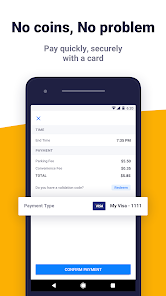
Passport Parking is a mobile payment app designed specifically for parking meters. It belongs to the utility and transportation category. Drivers use it to pay for parking sessions at participating locations without needing coins or credit cards at the meter. You download it from the Google Play or App Store, install it, and then launch it. It's free to download and has a significant install count, though exact numbers aren't publicly listed. After registration, you might encounter in-app prompts for adding payment methods, but the core feature doesn't require purchases. Ads are minimal to none, which is a relief. The first impression after opening is straightforward: it asks for your vehicle's license plate and state, then your location or zone number on the meter. It feels efficient, like it cuts through the hassle.
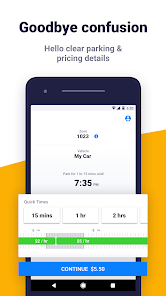
Using the app in daily life is simple. After launching, the main screen shows options to pay, find parking, or view history. The onboarding is quick—enter plate info, add a card, then you're set. The typical flow: pull over, check the meter for a zone number (usually posted on a sticker on the meter), open the app, type the zone code, set a timer for how long you want to pay, and confirm. The interface is clean with a map to locate meters, but sometimes it's slow to load if your data connection is weak. A smooth moment is the auto-extension feature, where you can add time remotely from a restaurant if you're running late. A confusing part is the initial setup—I kept tapping the wrong field for my license plate state. A practical tip: save your vehicle profile to speed up future payments.
After using Passport Parking for a while, it's a solid tool for city drivers in areas that support it. People who deal with metered parking daily—commuters, delivery drivers, or shoppers—will enjoy it. If you rarely park at meters or live in a suburban area with free parking, you likely won't need it. What sets it apart from similar apps like ParkMobile is the zone number entry—it feels more consistent across different cities. Another difference is the auto-extension feature, which is more reliable here than in some competitors. Someone might keep it installed because it removes the anxiety of rushing back to feed the meter. Others might uninstall if they move to a city that doesn't use it or if they prefer using a credit card directly at newer meters. It's fair, casual, and specific—it does one thing well without fuss.
features
- 🚗 Zone-Based Entry: Unlike ParkMobile which sometimes relies on GPS for location, Passport Parking uses a straightforward zone number from the meter. This cuts out guesswork if you're at a busy lot.
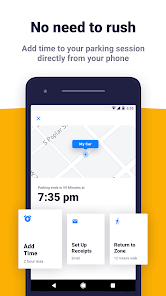
- ⏰ Auto-Extension: You can extend parking time remotely from the app, no need to return to the meter. This is smoother than PayByPhone, which often has a delay in processing extensions.
- 📱 Multiple Vehicle Profiles: The app lets you save several license plates, so switching between cars or rentals is quick. Other apps like SpotHero force you to re-enter vehicle info each time.
- 📋 Clear Payment History: A detailed log of past sessions with timestamps and amounts shows up easily. This makes expense tracking easier than in ParkMobile, where history is cluttered with irrelevant notifications.
pros
- 💪 Reliable Zone Code Entry: The zone input rarely fails, unlike ParkMobile where the GPS can misread your location and lock you out. It's a small win but feels dependable.
- 💪 Quick Transaction Speed: Payments process in seconds, faster than PayByPhone which sometimes hangs for 30 seconds. This saves time when you're in a rush.
- 💪 Simple Interface: Few buttons and no extra fluff. ParkMobile buries the pay option under a menu; Passport Parking keeps it front and center.
cons
- 📉 Limited City Coverage: Passport Parking only works in select cities, whereas ParkMobile is available in more locations. It's an issue if you travel often.
- 📉 No Guest Mode: You must register an account with a phone number and email before paying. PayByPhone allows one-time parking sessions without full sign-up.
- 📉 Occasional App Crashes: The app sometimes freezes on older phones, which is frustrating when a meter is ticking. ParkMobile runs more smoothly on various devices.
- 📉 Weak Customer Support: If a payment fails, resolving it via the in-app chat is slow; phone support is available but not always helpful. ParkMobile has a faster email response.
Recommended Apps
![]()
Phone Tracker - Phone Locator
Lutech Ltd4.1
![]()
Cartoon Photo Editor
AZ Mobile Software4.5
![]()
Speak to Santa™ - Video Call
North Pole Command Centre Limited4.4![]()
Gay Dating & LGBT Hookup App
Hookup Apps to Hook up Local Dating4.5![]()
Wonder - AI Art Generator
Codeway Dijital3.7![]()
Shazam: Find Music & Concerts
Apple Inc.4.8![]()
Lightroom Photo & Video Editor
Adobe4.5![]()
Crush Love Tester
A.L Studio3.7![]()
Daily Horoscope
Horoscope by Comitic4.8![]()
Kissing Test Calculator
We Love pranks3![]()
Filters for pictures - FaceArt
VysionApps2.8![]()
Pinterest
Pinterest4.5![]()
QR Code Reader Barcode Scanner
Celebrity App Studio3.9![]()
PicSo – Customize Your AI Girl
Meta Insight3.7![]()
Does He Like Me?
KDR Games4.3















Disclaimer
1.AppInfoLibrary does not represent any developer, nor is it the developer of any App or game.
2.AppInfoLibrary provide custom reviews of Apps written by our own reviewers, and detailed information of these Apps, such as developer contacts, ratings and screenshots.
3.All trademarks, registered trademarks, product names and company names or logos appearing on the site are the property of their respective owners.
4. AppInfoLibrary abides by the federal Digital Millennium Copyright Act (DMCA) by responding to notices of alleged infringement that complies with the DMCA and other applicable laws.
5.If you are the owner or copyright representative and want to delete your information, please contact us info@appinfolibrary.com.
6.All the information on this website is strictly observed all the terms and conditions of Google Ads Advertising policies and Google Unwanted Software policy .





























