


500,000,000+
Installs
Pinterest
Developer
-
Video Players & Editors
Category
-
Rated for 12+
Content Rating
-
help@pinterest.com
Developer Email
-
https://policy.pinterest.com/privacy-policy
Privacy Policy
Screenshots


editor reviews
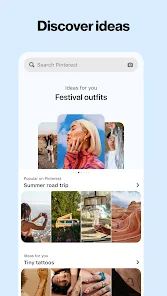
Pinterest is basically a visual discovery engine, not really a social network in the traditional sense. You use it to find ideas for pretty much anything — recipes, home decor, fashion, travel, DIY projects. After downloading and launching the app from Google Play or the App Store, the first thing that hits you is the endless grid of images. It feels overwhelming at first, like walking into a massive library where every book cover is a photo. Registration is free, and while there are no forced in-app purchases to browse, you do get served ads between pins, which is expected for a free service. The initial impression is that it's a beautiful, chaotic scrapbook that somehow knows what you're looking for.
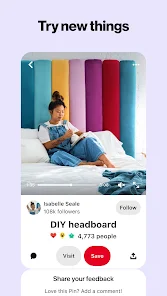
Once you start using it, the hands-on experience is pretty straightforward. You land on a feed of pins tailored to your interests based on what you've saved before. Tapping a pin opens a larger image with a link to the original source — a blog, a store, a tutorial. The onboarding process is smooth; you pick a few topics you like, and the algorithm adjusts quickly. Creating boards to organize your finds is simple, and the search function is surprisingly good at narrowing down specific styles or colors. One small practical tip: long-pressing a pin lets you save it faster. The interface feels fluid, though sometimes the endless scroll can make you lose track of time. I've had moments where I opened the app for a quick recipe idea and ended up planning a whole room makeover.
After using Pinterest for a while, I think it's great for creative planners, hobbyists, and anyone who likes visual inspiration. If you're someone who hates browsing and just wants direct answers, this app might feel like a time sink. What sets it apart from apps like Instagram or TikTok is intent — you're not here to follow people or watch random content; you're hunting for specific ideas. That makes it more useful for actual projects. I've kept it installed because it's genuinely helpful for meal prep and home organization. But I can see why someone would uninstall it if they find the feed too cluttered or if the algorithm starts showing things they've already seen a hundred times. It's a niche tool dressed up as a general app.
features
- ✴️ The core feature is the pin and board system. You save images (pins) from around the web into themed collections (boards). This is much more organized than Instagram's saved folders, which feel buried and less searchable. You can easily revisit your boards later, making Pinterest more like a personal visual library than a social feed.
- ✴️ Visual search is a standout. You can take a photo or upload an image, and Pinterest finds similar pins or products. It's far more accurate than Google Images for specific aesthetics. For example, if you see a chair you like in a movie screenshot, Pinterest can help you find it or something similar.
- ✴️ Collaborative boards let you share and add pins with friends or family. This is excellent for planning group trips, weddings, or home renovations. No other visual app makes collaboration this effortless without turning into a group chat mess.
pros
- 👍 Pinterest is fantastic for project planning. Unlike Instagram, where content is fleeting, your boards stay organized and accessible years later. I still have boards from 2018 that I reference.
- 👍 The algorithm learns your taste shockingly well. After a few saves, it feeds you exactly what you need. It's smarter than TikTok's discovery for niche hobbies like knitting or vintage car restoration.
- 👍 Almost no toxic social pressure. There are no follower counts, no likes, no public comments. You can explore without worrying about anyone's opinion. It's refreshing compared to the performance anxiety on platforms like Instagram.
cons
- 👎 The search results can get repetitive. If you look for one type of outfit, you'll see the same pin in slightly different colors for days. Google Images is less prone to this echo chamber effect.
- 👎 Many pins link to outdated or dead websites. You click a beautiful photo and get a 404 error. It happens often enough to be annoying, unlike Etsy, where everything is actively sold.
- 👎 The mobile app drains battery faster than usual. Scrolling through high-res images and videos is heavy on resources. Lightweight apps like We Heart It work better for quick browsing.
Recommended Apps
![]()
Phone Tracker - Phone Locator
Lutech Ltd4.1
![]()
Cartoon Photo Editor
AZ Mobile Software4.5
![]()
Speak to Santa™ - Video Call
North Pole Command Centre Limited4.4![]()
Gay Dating & LGBT Hookup App
Hookup Apps to Hook up Local Dating4.5![]()
Wonder - AI Art Generator
Codeway Dijital3.7![]()
Shazam: Find Music & Concerts
Apple Inc.4.8![]()
Lightroom Photo & Video Editor
Adobe4.5![]()
Crush Love Tester
A.L Studio3.7![]()
Daily Horoscope
Horoscope by Comitic4.8![]()
Kissing Test Calculator
We Love pranks3![]()
Filters for pictures - FaceArt
VysionApps2.8![]()
Pinterest
Pinterest4.5![]()
QR Code Reader Barcode Scanner
Celebrity App Studio3.9![]()
PicSo – Customize Your AI Girl
Meta Insight3.7![]()
Does He Like Me?
KDR Games4.3














Disclaimer
1.AppInfoLibrary does not represent any developer, nor is it the developer of any App or game.
2.AppInfoLibrary provide custom reviews of Apps written by our own reviewers, and detailed information of these Apps, such as developer contacts, ratings and screenshots.
3.All trademarks, registered trademarks, product names and company names or logos appearing on the site are the property of their respective owners.
4. AppInfoLibrary abides by the federal Digital Millennium Copyright Act (DMCA) by responding to notices of alleged infringement that complies with the DMCA and other applicable laws.
5.If you are the owner or copyright representative and want to delete your information, please contact us info@appinfolibrary.com.
6.All the information on this website is strictly observed all the terms and conditions of Google Ads Advertising policies and Google Unwanted Software policy .





























