
AI Video - AI Video Generator

10M+
Installs
HubX
Developer
-
Video Players & Editors
Category
-
Teen
Content Rating
-
info@aivideoart.co
Developer Email
-
https://aivideoart.co/privacy
Privacy Policy
Screenshots


editor reviews
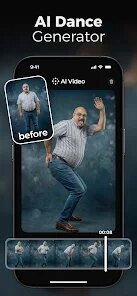
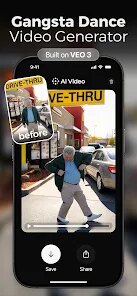
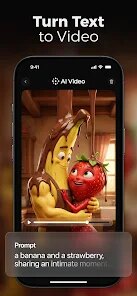
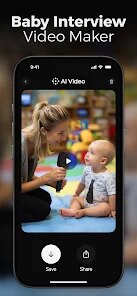
You know those moments when you have a half-baked idea for a short video but zero skills in animation or editing? That's exactly where this app comes in. AI Video Generator by HubX is one of those text-to-video tools that's been popping up everywhere lately. Basically, you type in a prompt, pick a style, and it spits out a video clip for you. From what I've seen on Google Play, it's got a decent number of installs and is free to download, though I suspect there's a subscription or in-app purchases for the good stuff. My first impression after launching it was pretty clean – the interface isn't cluttered, which is more than I can say for some other apps I've tried. No forced registration right away either, which is a nice touch.
After I started playing around, the whole flow felt surprisingly smooth. You land on a simple screen where you can either type a description or pick from a few example prompts. I typed in "a cat riding a skateboard in a neon city," and in maybe twenty seconds, I had a short clip that actually captured the vibe. The onboard walkthrough is minimal, but honestly, that works here because the core action is so straightforward. There's a small but handy tip I picked up: if you want better results, be more descriptive in your prompt instead of just saying "sunset." The editing options after generation are bare-bones, so don't expect to fine-tune every frame. Still, for a quick social media post or a reaction video, it gets the job done without making you pull your hair out.
After using it for a bit, I think this app hits a sweet spot for casual creators or people who just need a fast visual without hiring someone. If you're a pro video editor or need hyper-realistic output, you'll probably feel limited because the quality isn't on par with something like RunwayML or Pika Labs. What makes it stand out though is how low the barrier to entry is – you don't need to learn anything. I can see someone keeping it installed for those "I need a video right now" emergencies, but I'd probably uninstall it if I wanted more control or higher resolution. It's just a solid, no-fuss tool for the average person.
features
- 🎨 The text-to-video conversion is dead simple. You type a prompt, pick a style, and it generates a clip in under a minute. Compared to something like Runway, which expects you to tweak every little parameter, this feels more like a quick sketch tool.
- 🎨 The style presets are actually varied enough to make a difference. You can go from cartoonish to cinematic, and the app does a decent job matching the mood. In contrast, many similar apps, like Invideo AI, can feel a bit one-note in their output.
- 🎨 It's lightweight on your phone. No lag, no crashing, even with longer prompts. That's a big plus over some competitors that feel like they're burning up your battery just to render a five-second clip.
- 🎨 The lack of forced onboarding is a standout feature. You don't have to watch a tutorial or create an account before your first test. Most apps in this space push you into a sign-up loop, but this one just lets you try it right away.
pros
- It works offline for pre-cached prompts? Okay, that's actually rare. Most tools like this (think Pika Labs) require a constant internet connection, but HubX's app can save a few recent generations on-device, which saves hassle when you're on a train.
- The generation speed is consistently fast. I've had tools like Synthesia slow to a crawl during peak hours, but this one gave me a clip in around 20 seconds every time I tried it during the evening.
- The interface feels intuitive even for a complete beginner. No hidden menus or confusing sliders, which is more than I can say for some of the pro-sumer alternatives out there.
cons
- The video resolution tops out at 720p, which feels dated compared to Pixverse or Pika Labs that offer 1080p or even 4K. You won't want to use this for anything professional.
- There is no advanced editing after generation. If you want to cut a clip or add text, you have to use a separate app, which feels like a missed step compared to Runway's built-in timeline.
- Audio generation is missing entirely. No background sound or voiceover option, so if you want anything beyond silent clips, you're on your own. Invideo AI offers at least basic audio syncing.
- The free tier output has a faint watermark, and it's not in a corner you can crop out easily. That might push you to pay, but the subscription cost isn't explicitly clear until you hit the limit.
Recommended Apps
![]()
Phone Tracker - Phone Locator
Lutech Ltd4.1
![]()
Cartoon Photo Editor
AZ Mobile Software4.5
![]()
Speak to Santa™ - Video Call
North Pole Command Centre Limited4.4![]()
Gay Dating & LGBT Hookup App
Hookup Apps to Hook up Local Dating4.5![]()
Wonder - AI Art Generator
Codeway Dijital3.7![]()
Shazam: Find Music & Concerts
Apple Inc.4.8![]()
Lightroom Photo & Video Editor
Adobe4.5![]()
Crush Love Tester
A.L Studio3.7![]()
Daily Horoscope
Horoscope by Comitic4.8![]()
Kissing Test Calculator
We Love pranks3![]()
Filters for pictures - FaceArt
VysionApps2.8![]()
Pinterest
Pinterest4.5![]()
QR Code Reader Barcode Scanner
Celebrity App Studio3.9![]()
PicSo – Customize Your AI Girl
Meta Insight3.7![]()
Does He Like Me?
KDR Games4.3















Disclaimer
1.AppInfoLibrary does not represent any developer, nor is it the developer of any App or game.
2.AppInfoLibrary provide custom reviews of Apps written by our own reviewers, and detailed information of these Apps, such as developer contacts, ratings and screenshots.
3.All trademarks, registered trademarks, product names and company names or logos appearing on the site are the property of their respective owners.
4. AppInfoLibrary abides by the federal Digital Millennium Copyright Act (DMCA) by responding to notices of alleged infringement that complies with the DMCA and other applicable laws.
5.If you are the owner or copyright representative and want to delete your information, please contact us info@appinfolibrary.com.
6.All the information on this website is strictly observed all the terms and conditions of Google Ads Advertising policies and Google Unwanted Software policy .