

Photo Frames

10M+
Installs
Csmartworld
Developer
-
Video Players & Editors
Category
-
Everyone
Content Rating
-
csmartworld@gmail.com
Developer Email
-
https://sites.google.com/view/csmartworld/home
Privacy Policy
Screenshots



editor reviews
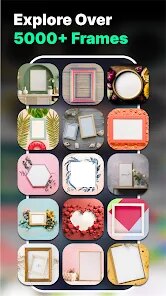
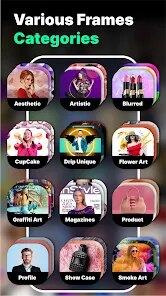
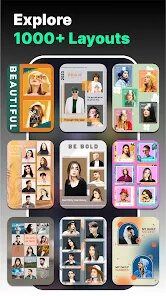
Photo Frames is a mobile utility app, essentially a digital dressing-up box for your pictures. You download it from the Google Play Store, tap install, and within seconds you're looking at a grid of thumbnail previews showing different border styles. It's one of those free apps you grab on a whim when you want to jazz up a selfie for a social media post or quickly make a memory look a bit more polished without opening a full editing suite. The first impression after launching is pretty straightforward: the interface is simple, almost bare-bones, with categories like “Love,” “Festival,” or “Nature” sitting at the top. There's no aggressive registration wall or complicated setup, which is a relief. You just pick a category and start tapping.
After you pick a frame, the real hands-on part begins. You tap the camera icon or gallery button to add your photo, and the app places it behind the chosen border. You can then pinch to zoom or drag the image around to fit it just right inside the cutout. For a casual user, this is the main action loop: Browse frames, load a photo, adjust the position, and save. During daily use, I found the browsing part is where you spend most of your time. The frames themselves are a mixed bag—some are tasteful, others feel a bit dated. Onboarding is nonexistent, which is fine for this kind of app, but the saving process is a little clunky. You have to hit a small save icon, then confirm the resolution, and sometimes it takes a couple of seconds to process. A small practical tip is to use high-resolution photos, because low-res ones get blurry when you zoom them into a large frame.
After using it for a while, my personal take is that this app serves a very specific, casual purpose. It's perfect for someone who wants to create quick, themed photo collages for a birthday post or a holiday greeting without learning any real editing skills. But if you're looking for more control over filters, text overlays, or advanced compositing, you'll outgrow it fast. Compared to apps like PicsArt or Canva, Photo Frames feels limited and a bit one-dimensional. What makes it different is its single-minded focus on frames—there's no clutter. However, the lack of updates and somewhat outdated design choices might make you uninstall it after the novelty wears off. I can see someone keeping it installed for specific occasions, like making a framed memory for a family group chat, but it's not something I'd open every day.
features
- 🖼️ Pre-made Themes: The app offers a wide variety of themed frame collections, such as “Love,” “Birthday,” and “Festival,” which makes it easy to find a style for a specific occasion quickly. In comparison, more advanced apps like Adobe Express have templates but require more manual searching and filtering, whereas Photo Frames organizes them upfront for immediate browsing.
- 📏 One-Tap Photo Fitting: The standout feature is how it automatically places your photo behind the frame and then lets you adjust with simple pinch-to-zoom and drag gestures. This is much more straightforward than in apps like PhotoDirector, where you might need to manually erase backgrounds or adjust layers to achieve a similar framed effect.
- 💾 Lightweight and Fast: The app is small in size and launches almost instantly, even on older phones. Unlike feature-heavy apps like PicsArt, which can feel bloated and slow to load, Photo Frames gets you from launch to a saved image within a minute or two.
pros
- 💰 Truly Free Without Annoying Limits: Unlike many free photo editors that gatekeep good frames behind a paywall, this app lets you use almost all of its borders without forcing a subscription. For example, apps like Canva lock their best frames behind a “Pro” label, but Photo Frames feels generous by comparison.
- 🎯 Laser Focus on One Task: The app does one thing—frame your photos—and doesn't try to be a full suite. This makes it less intimidating than something like Snapseed or Lightroom, which have a steep learning curve if you just want a quick border effect.
- 🌐 No Account Required: You don't need to sign up, create an account, or grant unnecessary permissions. This is a huge plus over apps like PicCollage, which push login prompts and social sharing hard before you even start editing.
cons
- 💤 Outdated Design and Assets: Many of the frames look like they were designed years ago, with dated clipart-style decorations and low-resolution textures. More modern apps like PicsArt or Bazaart offer sleek, contemporary frame options that look much less cheesy.
- 🔇 No Editing Tools Inside the Frame: Once you place your photo, you can't apply filters, adjust brightness, or add text without leaving the app. Apps like Canva or Instagram's story editor let you do all of this in one place, making Photo Frames feel incomplete for a polished final product.
- 🛑 Occasional Ads and Lag: While the app is free, it does show banner and full-screen ads that can interrupt the flow. Additionally, saving a high-resolution image sometimes causes a noticeable lag or a brief freeze, which is frustrating compared to the smooth performance of apps like Adobe Lightroom.
Recommended Apps
![]()
Phone Tracker - Phone Locator
Lutech Ltd4.1
![]()
Cartoon Photo Editor
AZ Mobile Software4.5
![]()
Speak to Santa™ - Video Call
North Pole Command Centre Limited4.4![]()
Gay Dating & LGBT Hookup App
Hookup Apps to Hook up Local Dating4.5![]()
Wonder - AI Art Generator
Codeway Dijital3.7![]()
Shazam: Find Music & Concerts
Apple Inc.4.8![]()
Lightroom Photo & Video Editor
Adobe4.5![]()
Crush Love Tester
A.L Studio3.7![]()
Daily Horoscope
Horoscope by Comitic4.8![]()
Kissing Test Calculator
We Love pranks3![]()
Filters for pictures - FaceArt
VysionApps2.8![]()
Pinterest
Pinterest4.5![]()
QR Code Reader Barcode Scanner
Celebrity App Studio3.9![]()
PicSo – Customize Your AI Girl
Meta Insight3.7![]()
Does He Like Me?
KDR Games4.3















Disclaimer
1.AppInfoLibrary does not represent any developer, nor is it the developer of any App or game.
2.AppInfoLibrary provide custom reviews of Apps written by our own reviewers, and detailed information of these Apps, such as developer contacts, ratings and screenshots.
3.All trademarks, registered trademarks, product names and company names or logos appearing on the site are the property of their respective owners.
4. AppInfoLibrary abides by the federal Digital Millennium Copyright Act (DMCA) by responding to notices of alleged infringement that complies with the DMCA and other applicable laws.
5.If you are the owner or copyright representative and want to delete your information, please contact us info@appinfolibrary.com.
6.All the information on this website is strictly observed all the terms and conditions of Google Ads Advertising policies and Google Unwanted Software policy .





























