

Moises: The Musician's AI App

50M+
Installs
Moises Systems
Developer
-
Entertainment
Category
-
Everyone
Content Rating
-
playstore@moises.ai
Developer Email
-
https://app.moises.ai/privacy
Privacy Policy
Screenshots
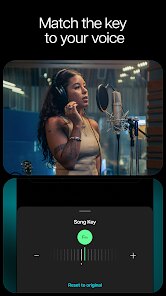
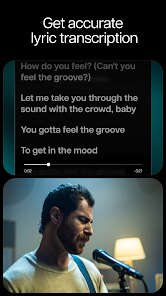
editor reviews
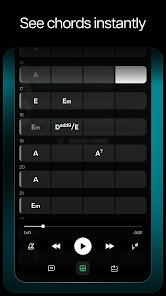
Moises is basically a digital audio workstation powered by machine learning, designed specifically for musicians, producers, and anyone who wants to mess around with their music tracks. You can find it on both Google Play and the App Store, and there's also a desktop version. After downloading and launching it, the first thing that hits you is how a tool like this is even free to start. The install count is huge, which makes sense because it solves a really common problem: you hear a song and wish you could pull out just the vocals or just the drums. The initial impression is that it feels almost too powerful to be this accessible, and you're immediately asked to upload or search for a song before you see anything else. There are in-app purchases for the premium features, but the free tier is shockingly functional right out of the gate.
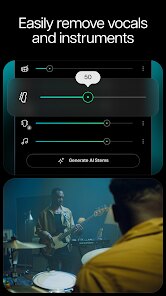
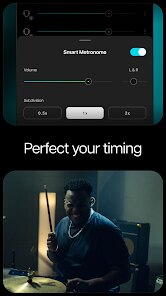
Once you're inside, the hands-on experience is pretty straightforward. You can either import a file from your library or paste a YouTube link. After the app processes the track, which takes maybe ten to fifteen seconds for a typical song, you get this clean interface where each stem—vocals, bass, drums, and other instruments—is isolated and displayed as its own audio file. The first time I did it with a Fleetwood Mac song, I genuinely thought it was a fluke because the separation was so clean. You can mute the original vocals and jam over the backing track, or just solo the bass line to figure out the groove. A practical tip I picked up is to use the metronome feature in practice mode, because it keeps you locked in when you're trying to play along. There's a bit of a learning curve with the EQ settings in the mixer, but the main workflow—upload, separate, adjust, play—is dead simple and rarely glitches.
After using it for a few weeks, I'd say this app is a godsend if you're a gigging musician who needs to learn songs fast, or a vocalist looking for karaoke tracks that don't sound like they came from a cheap MIDI file. It's not really for casual listeners who just want to remix for fun, because the free tier limits how many stems you can export. Compared to apps like Vocal Remover or PhonicMind, Moises feels way more polished and the separation quality is noticeably better, especially on dense mixes. The reason I keep it installed is for the pitch and tempo changers; I can slow down a tough guitar solo without making it sound like mud. That said, I could see someone uninstalling it if they don't actively practice instruments, because the real power of the app is as a learning companion, not just a novelty.
features
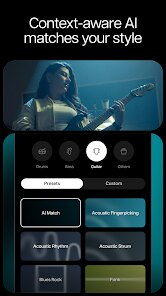
- 🎵 Moises uses AI to split a song into individual stems like vocals, drums, and bass. In comparison, apps like LALAL.AI do similar separation but often struggle with clarity on live recordings. Moises handles messy audio better because it has deeper machine learning training on raw tracks.
- 🎵 The app includes a smart metronome that syncs with the BPM of any song, even if the tempo changes. Other apps like Anytune require manual BPM detection, and they often get it wrong with complex jazz or progressive rock. Moises wins here because it analyzes the whole track first.
- 🎵 Moises offers an Audio to MIDI converter, which lets you convert melodic stems into MIDI files for editing in a DAW. Services like Melodyne do this but at a much higher cost and complexity. For bedroom producers, this feature alone justifies the subscription.
pros
- 👍 Sound quality is the biggest strength. Moises separates stems with almost zero artifacts, while free alternatives like Unmixr often leave a metallic ring on the vocals. You can actually hear the raw bass with no fuzzy distortion.
- 👍 The browser-based upload from YouTube is a game-changer. You don't need to own the song file. Apps like Splitter don't offer this, so you have to source audio files separately. Moises saves you that extra step.
- 👍 It updates frequently with new features. The developers actually listen to user feedback. For example, they added adjustable stem depth quickly after launch. Other apps just stay static for years.
cons
- 👎 The free tier is very restrictive. You only get a limited number of monthly separations, and you can't export stems without paying. Competitors like Slice do offer more generous free allowances for casual use.
- 👎 It has occasional sync issues with larger files. If you try to split a high-quality WAV of a live concert, the app sometimes crashes or takes forever to process. PhonicMind handles larger files more reliably.
- 👎 The mobile app drains battery fast. Running AI processing on a phone gets hot and eats charge. The desktop version is smoother for long sessions, so mobile users feel a bit left out.
Recommended Apps
![]()
Phone Tracker - Phone Locator
Lutech Ltd4.1
![]()
Cartoon Photo Editor
AZ Mobile Software4.5
![]()
Speak to Santa™ - Video Call
North Pole Command Centre Limited4.4![]()
Gay Dating & LGBT Hookup App
Hookup Apps to Hook up Local Dating4.5![]()
Wonder - AI Art Generator
Codeway Dijital3.7![]()
Shazam: Find Music & Concerts
Apple Inc.4.8![]()
Lightroom Photo & Video Editor
Adobe4.5![]()
Crush Love Tester
A.L Studio3.7![]()
Daily Horoscope
Horoscope by Comitic4.8![]()
Kissing Test Calculator
We Love pranks3![]()
Filters for pictures - FaceArt
VysionApps2.8![]()
Pinterest
Pinterest4.5![]()
QR Code Reader Barcode Scanner
Celebrity App Studio3.9![]()
PicSo – Customize Your AI Girl
Meta Insight3.7![]()
Does He Like Me?
KDR Games4.3















Disclaimer
1.AppInfoLibrary does not represent any developer, nor is it the developer of any App or game.
2.AppInfoLibrary provide custom reviews of Apps written by our own reviewers, and detailed information of these Apps, such as developer contacts, ratings and screenshots.
3.All trademarks, registered trademarks, product names and company names or logos appearing on the site are the property of their respective owners.
4. AppInfoLibrary abides by the federal Digital Millennium Copyright Act (DMCA) by responding to notices of alleged infringement that complies with the DMCA and other applicable laws.
5.If you are the owner or copyright representative and want to delete your information, please contact us info@appinfolibrary.com.
6.All the information on this website is strictly observed all the terms and conditions of Google Ads Advertising policies and Google Unwanted Software policy .




























