
CarGurus: Used & New Cars

10M+
Installs
CarGurus, Inc
Developer
-
Auto & Vehicles
Category
-
Everyone
Content Rating
-
android_developer@cargurus.com
Developer Email
-
http://www.cargurus.com/Cars/privacyPolicy.html
Privacy Policy
Screenshots

editor reviews
CarGurus: Used & New Cars is a car shopping app from CarGurus, Inc. It helps you search local listings, compare prices, and get a sense of whether a deal is actually good. You can download it free on Google Play or the App Store, and it has millions of installs. There are no upfront costs to browse, though you will need to register an account if you want to save cars or contact sellers. The app does show ads and may offer in-app purchases for extra services. A normal person installs it because they are tired of scrolling through random listings and wondering if the asking price is fair. When you first launch it, the screen feels busy but not overwhelming. You see a search bar, a map, and a feed of cars near you. It does not force you into a tutorial, which is nice if you already know what you are looking for. The first impression is practical, almost like a tool rather than a flashy showroom.
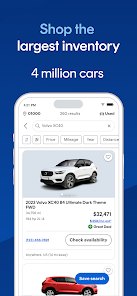
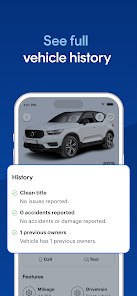
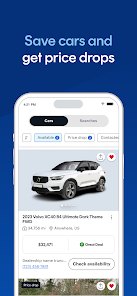
Once you start using it, the flow becomes pretty clear. You type in a make and model, set your price range, and the app pulls up listings from dealers and private sellers. Each listing shows a deal rating, like "Great Deal" or "High Price," based on how the car compares to similar ones nearby. That rating is the main hook. I found myself checking it before even reading the mileage or photos. The map view helps if you want to stay within a certain distance, and you can save cars to a list for later. One small tip: set your search radius carefully, because widening it too much can flood you with results from far away. The app also lets you contact sellers through the app or by phone, and some listings have a "Free CarFAX Report" link. The experience is mostly smooth, though occasionally the filters reset when you go back to the main screen. It is not a huge problem, but it can be annoying if you are comparing several models.
After using it for a few weeks, I think CarGurus works best for people who want a second opinion on pricing without talking to a salesperson. It is not the place to find rare classics or project cars. For that, you would probably go to Facebook Marketplace or a niche forum. Compared with apps like Autotrader or Cars.com, CarGurus feels more focused on the deal rating than on browsing beautiful photos. That is both its strength and its limitation. If you just want to know if a listing is overpriced, it is great. If you want a deep dive into a car's history or a more curated selection, you might keep another app around. I will probably keep it installed until I buy a car, and then delete it. It is useful, but it does not have much to offer once the shopping is done.
features
- 🔍 The deal rating is the standout feature. It instantly tells you if a listing is priced above or below market value, which saves a lot of mental math.
- 🔍 Compared with Autotrader, CarGurus puts price analysis front and center. Autotrader has a wider range of filters and a cleaner browsing experience, but CarGurus is faster at answering "is this a fair price?"
- 🔍 The map-based search is genuinely useful. You can see clusters of cars in your area and adjust your radius on the fly, which feels more natural than scrolling through a long list.
- 🔍 The most outstanding feature is the "Great Deal" badge. It is simple, but it changes how you shop. You stop guessing and start comparing actual numbers.
pros
- 👍 The price rating system is more transparent than what you get on Cars.com. It shows you the comparison directly, not just a vague "good price" label.
- 👍 Listing volume is strong. You will find plenty of used cars from both dealers and private sellers, which makes it easier to compare options in one place.
- 👍 The app is free to use and does not lock basic search behind a paywall. That puts it ahead of some competitors that charge for similar pricing insights.
cons
- 👎 The interface can feel cluttered. Autotrader and Carvana have cleaner layouts, and CarGurus sometimes buries useful filters under too many taps.
- 👎 Some listings are stale or already sold. You will occasionally call about a car that is no longer available, which wastes time compared with Carvana's more controlled inventory.
- 👎 The ads and upsells for extra services can be distracting. It is not as aggressive as some free apps, but it still pulls you away from the main task.
Recommended Apps
![]()
Voi - AI Avatar Portrait Maker
Codeway Dijital2.2
![]()
Amazon Shopping
Amazon Mobile LLC4.1![]()
Chai: Chat AI Platform
Chai Research Corp.4.3![]()
Haircut prank, air horn & fart
ABI Game Studio3.2![]()
Yuka - Food & cosmetic scan
Yuka App4.7
![]()
AstroSoul: Astro Palm Reader
Appmaking LTD4.5![]()
Grok
xAI4.9![]()
CarGurus: Used & New Cars
CarGurus, Inc4.8![]()
Japevox - Funny Prank Sound
SecureTool4.3![]()
Geeni
Merkury Innovations4.6![]()
FlickReels - Short Drama & TV
FARSUNPTE.LTD.4.6![]()
Pollo AI: AI Video Generator
COCOSOFT TECHNOLOGY PTE. LTD.4.4![]()
Call Santa Claus: Prank Call
Jaadoo Studio0![]()
PawAI: AI Cartoon Pet Filter
Now Tech3.1![]()
Brainova: IQ Test & Logic Game
FALCON GAME4.5