
Autolist: Used Car Marketplace

5M+
Installs
Autolist
Developer
-
Auto & Vehicles
Category
-
Everyone
Content Rating
-
feedback@autolist.com
Developer Email
-
http://www.autolist.com/pages/privacy
Privacy Policy
Screenshots

editor reviews
Autolist is a used car marketplace app that helps shoppers browse real listings from dealerships and private sellers, compare prices, and check vehicle history before making contact. It sits in the same category as CarGurus, Cars.com, and Carvana, though its focus leans more toward browsing and research than actually completing a purchase online. You can download it free from Google Play or the App Store, install it in under a minute, and start searching without creating an account. Registration is optional, and I did not run into any paywall during a normal browsing session. Autolist has been downloaded a large number of times over the years, and the free version does show ads, particularly around sponsored dealership listings, while in-app purchases are not really part of the core experience.
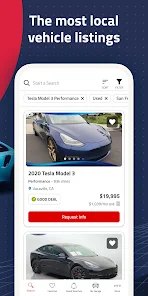
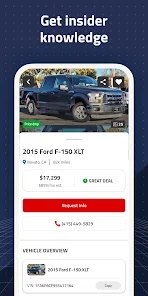
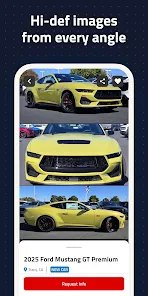
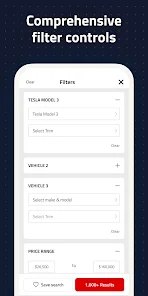
Opening the app for the first time, the home screen drops you straight into search rather than a long onboarding tour. You enter a make, model, price range, and ZIP code, and results appear quickly with photos, mileage, and a price rating that tells you whether the listing is below or above market. Tapping a car opens a detail page with specs, dealer contact info, and sometimes a history summary. The filters are genuinely useful, especially sorting by distance, title status, and price drops. One small thing I appreciated is the saved search feature, which quietly notifies you when new matches appear. On the other hand, some listings feel stale, and I occasionally tapped a car only to find it was already sold. A practical tip: always call or message the dealer before driving out, since inventory updates lag behind real-time.
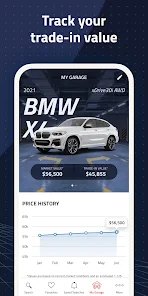
After using Autolist for a couple of weeks during a casual car search, I think it works best for someone who already knows roughly what they want and just needs a broad view of the local market. It is less appealing if you want financing tools, instant online purchase, or detailed inspection reports baked in. Compared with CarGurus, Autolist feels lighter and less cluttered, though CarGurus often has stronger price analysis. Someone who enjoys researching before committing will probably keep it installed; someone who wants a one-stop buying flow may uninstall it after a few sessions. For me, it earns a place as a browsing companion rather than a final decision-maker.
features
- 🔍 The search filters are the core of the app, letting you narrow by price, mileage, year, distance, and even days on market, which makes scanning local inventory much faster than scrolling through generic classifieds.
- 🔍 Price ratings appear directly on listings, showing whether a car is priced below, at, or above similar vehicles in the area, similar to what CarGurus does but with a simpler presentation.
- 🔍 Saved searches and alerts are the standout feature for me, because they keep working in the background and surface new matches without forcing you to reopen the app every day.
- 🔍 Dealer contact options are built into each listing, so you can call, message, or get directions without copying details into another app.
pros
- 😀 It is noticeably cleaner and faster than Cars.com, which often feels packed with banners and upsells.
- 😀 The price rating system gives quick context, and for casual shoppers it is easier to read than CarGurus' more detailed analytics.
- 😀 Saved search alerts are reliable and make it feel like a useful watchdog rather than a passive listing board.
- 😀 No account is required for basic browsing, which lowers the barrier compared with apps that push registration early.
cons
- 😕 Listings can go stale, and sold cars sometimes remain visible, which is a common issue but still frustrating compared with Carvana's more controlled inventory.
- 😕 There is no built-in financing or purchase flow, so it cannot replace a fuller marketplace like CarGurus for end-to-end buying.
- 😕 Ads and sponsored dealer placements take up visible space, and they can blend into organic results more than I would like.
- 😕 Vehicle history details are limited, so you often still need a separate service like Carfax before getting serious.
Recommended Apps
![]()
Voi - AI Avatar Portrait Maker
Codeway Dijital2.2
![]()
Amazon Shopping
Amazon Mobile LLC4.1![]()
Chai: Chat AI Platform
Chai Research Corp.4.3![]()
Haircut prank, air horn & fart
ABI Game Studio3.2![]()
Yuka - Food & cosmetic scan
Yuka App4.7
![]()
AstroSoul: Astro Palm Reader
Appmaking LTD4.5![]()
Grok
xAI4.9![]()
CarGurus: Used & New Cars
CarGurus, Inc4.8![]()
Japevox - Funny Prank Sound
SecureTool4.3![]()
Geeni
Merkury Innovations4.6![]()
FlickReels - Short Drama & TV
FARSUNPTE.LTD.4.6![]()
Pollo AI: AI Video Generator
COCOSOFT TECHNOLOGY PTE. LTD.4.4![]()
Call Santa Claus: Prank Call
Jaadoo Studio0![]()
PawAI: AI Cartoon Pet Filter
Now Tech3.1![]()
Brainova: IQ Test & Logic Game
FALCON GAME4.5