
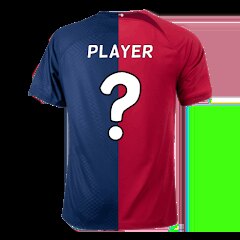
Football Jersey Maker

5M+
Installs
AJ DEVS
Developer
-
Entertainment
Category
-
Everyone
Content Rating
-
ajdevsgroup@gmail.com
Developer Email
-
https://jerseymakr.com/privacy-policy
Privacy Policy
Screenshots
editor reviews
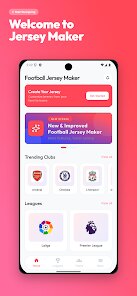
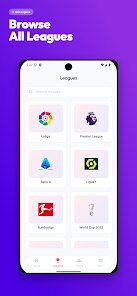
Football Jersey Maker is a mobile utility app that lets you design custom soccer jerseys right on your phone. It falls under the creative or sports design category, and you mainly use it to pick colors, add numbers, choose patterns, and put together a shirt that looks like something a real team would wear. I came across it on Google Play while looking for something fun to try before a weekend match with friends. The download was quick and it's free to install with no upfront cost. After launching it, the first impression is a bit mixed — the interface feels basic and the loading screen takes a moment, but once you're in, the tools are straightforward enough to get started without reading any manual.
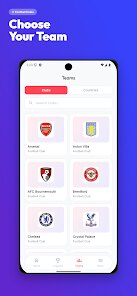
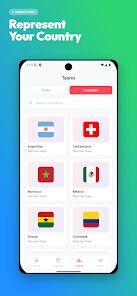
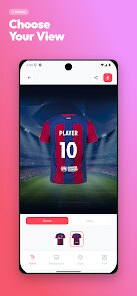
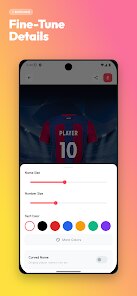
Getting into the actual use, you start by picking a base template from a few blank shirt outlines. From there, you tap on different parts like the sleeves, collar, or front panel to change colors. There's a limited palette of preset options, which can feel restrictive after a while. You then add numbers and text — the font selection is small but decent. The whole process follows a step-by-step flow, so it's hard to get lost even if you're not a designer. I did notice that the app sometimes lags when switching between tabs, and the preview render could be sharper. On the plus side, saving your design is easy, and you can export the image straight to your gallery to share with teammates.
After tinkering with it for a few days, I'd say Football Jersey Maker works best for someone who just wants a quick, no-nonsense design tool for fun or amateur teams. It's not built for high-end graphics or detailed kit creation, so if you're expecting something like the depth of a professional software, you'll be let down. Compared to apps like Jersey Designer or Kit Creator, this one feels more bare-bones and less polished. I might keep it installed for a quick hobby project, but I can see myself uninstalling it after that. It does the job for free with no paywalls blocking basic features, which is a fair trade-off for the rough edges.
features
- 🎨 You can tweak colors on different jersey sections separately, which gives you decent control over the final look without needing any artistic skill.
- 🏷️ Adding numbers and short text is simple — just type, pick a spot, and adjust the size. It's not fancy but works for team names or player numbers.
- 📱 The export feature lets you save your design as a high-res image directly to your phone, making it easy to print or share on social media.
- 💸 Unlike more advanced apps like Jersey Creator, this one keeps all core tools free with no forced subscriptions, so you can design as many shirts as you want without worrying about costs.
pros
- 👍 It's completely free to download and use, which puts it ahead of apps like Team Jersey Maker that lock basic editing behind a paywall.
- 👍 The interface is minimal and uncluttered, so you won't waste time hunting for buttons — a clear win over cluttered tools like Kit Designer Pro.
- 👍 Saving and sharing your designs takes only a few taps, making it more practical for casual users compared to apps that force you through extra export steps.
cons
- 👎 The color palette is too small and lacks custom hex input, so if you want a specific shade you're stuck — something Jersey Designer handles much better.
- 👎 The preview quality is low and doesn't show realistic fabric textures, making the final result look flat next to apps like Kit Creator.
- 👎 Occasional lag and crashes during editing can ruin your flow, especially when you compare it to the smoother performance of Team Shirt Studio.
- 👎 There's no option to add logos or upload custom images, which severely limits creativity and makes it feel incomplete versus more flexible alternatives.
Recommended Apps
![]()
Phone Tracker - Phone Locator
Lutech Ltd4.1
![]()
Cartoon Photo Editor
AZ Mobile Software4.5
![]()
Speak to Santa™ - Video Call
North Pole Command Centre Limited4.4![]()
Gay Dating & LGBT Hookup App
Hookup Apps to Hook up Local Dating4.5![]()
Wonder - AI Art Generator
Codeway Dijital3.7![]()
Shazam: Find Music & Concerts
Apple Inc.4.8![]()
Lightroom Photo & Video Editor
Adobe4.5![]()
Crush Love Tester
A.L Studio3.7![]()
Daily Horoscope
Horoscope by Comitic4.8![]()
Kissing Test Calculator
We Love pranks3![]()
Filters for pictures - FaceArt
VysionApps2.8![]()
Pinterest
Pinterest4.5![]()
QR Code Reader Barcode Scanner
Celebrity App Studio3.9![]()
PicSo – Customize Your AI Girl
Meta Insight3.7![]()
Does He Like Me?
KDR Games4.3















Disclaimer
1.AppInfoLibrary does not represent any developer, nor is it the developer of any App or game.
2.AppInfoLibrary provide custom reviews of Apps written by our own reviewers, and detailed information of these Apps, such as developer contacts, ratings and screenshots.
3.All trademarks, registered trademarks, product names and company names or logos appearing on the site are the property of their respective owners.
4. AppInfoLibrary abides by the federal Digital Millennium Copyright Act (DMCA) by responding to notices of alleged infringement that complies with the DMCA and other applicable laws.
5.If you are the owner or copyright representative and want to delete your information, please contact us info@appinfolibrary.com.
6.All the information on this website is strictly observed all the terms and conditions of Google Ads Advertising policies and Google Unwanted Software policy .





























