
Custom Kicks

100K+
Installs
Sneakerz
Developer
-
Entertainment
Category
-
Everyone
Content Rating
-
hello@customkicks.app
Developer Email
-
http://sneakerz.dev/privacy-policy/
Privacy Policy
Screenshots
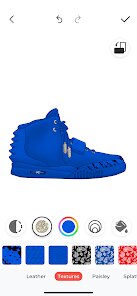
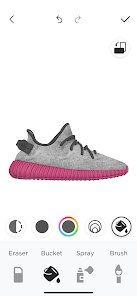
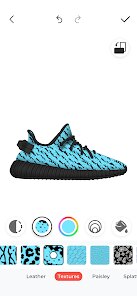
editor reviews
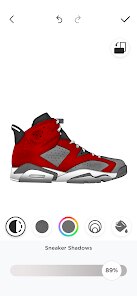
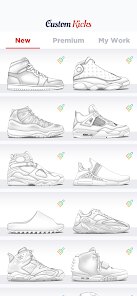
Custom Kicks is a mobile app that lets you design your own custom sneakers without ever touching a real shoe. You can pick from various base models like Air Force 1s or Air Jordans, then play around with colors, materials, and patterns until you get something that feels uniquely yours. It's available for free download on both Google Play and the App Store, and when you first launch it, you're greeted by a clean, modern interface that immediately makes you want to start creating. The initial impression is actually quite strong — the app feels polished and responsive, and you can tell right away that a lot of thought went into making the design tools accessible even if you've never used anything like this before.
Once you're in, the experience is surprisingly smooth. The onboarding walks you through the basics with quick, unobtrusive tips, and within a minute or two you're already tweaking a shoe. The main workflow is straightforward: you pick a model, then tap on different parts of the shoe — the toe, the side panels, the heel — and swap colors or textures. There's a real-time 3D preview that rotates as you work, so you can see how your choices actually look from every angle. I did hit a few moments where the material selection menu felt a bit cramped on my phone screen, but overall it's intuitive. One little trick I picked up: you can double-tap a color to save it as a favorite, which makes experimenting way faster. The app also lets you save your designs and share them with friends, which is a nice touch for getting feedback before you commit to anything.
After spending a couple of weeks with Custom Kicks, I think it's a solid choice for anyone who enjoys sneaker culture but doesn't want to drop serious money on real custom pairs. It's less about practical shopping and more about pure creativity — kind of like a coloring book for sneakerheads. Compared to apps like Nike By You, which are tied to actual purchasing, Custom Kicks feels more like a sandbox where you can just play around without pressure. You'll probably keep it installed if you like brainstorming designs or showing off concepts on social media. On the flip side, if you're only interested in buying real shoes, you might find it pointless after a while. The app does have in-app purchases for premium materials and ad removal, but the free version already offers plenty to keep you busy. I'd say it's worth a download if you're into sneakers or just like messing around with visual design tools.
features
- 🎨 Real-time 3D editing lets you spin the shoe around and see exactly how your color and material choices look from every angle, which is a huge step up from apps like GOAT's simple 2D mockups. You can change the laces, stitching, and even the sole color individually, so nothing feels locked down.
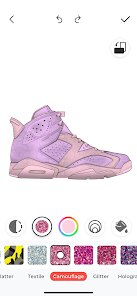
- 🖌️ The material library is surprisingly deep — you've got leather, suede, mesh, patent leather, and even patterns like camo or tie-dye. What sets it apart from Nike By You is that you're not limited to preset combos; you can mix materials however you want, which opens up way more creative possibilities.
- 📤 Built-in sharing features let you export your design as a high-res image or a short video rotating the shoe, so you can post it on Instagram or send it to friends for feedback. This makes it feel more like a social tool than just a design app, which I haven't seen done well in other sneaker apps.
- 💾 The autosave and cloud sync features mean you never lose progress, and you can pick up where you left off on another device. That kind of reliability is rare in free design apps and makes a big difference when you're in the middle of a complex build.
pros
- 🎨 The color picker is way more flexible than what you get in StockX's design tools — you can use custom hex codes instead of just picking from a small preset palette, which is a game-changer for matching real-world colors.
- 🎨 Material layering is a standout feature that apps like Adidas miadidas don't offer. You can stack textures on top of each other, like putting a transparent mesh over a solid leather, to create genuinely unique looks.
- 🎨 The free version gives you access to nearly all base models and a huge chunk of the material library, unlike NOAH's customization app which locks most cool options behind a paywall. You can actually make decent designs without spending a dime.
cons
- 🎨 The 3D model can get a bit laggy on older phones, especially when you're applying complex materials like reflective foil. Nike By You runs more smoothly on a wider range of devices, probably because their models are simpler.
- 🎨 There's no way to see real pricing for the custom designs you create. Apps like Miadidas show you an estimated cost based on your choices, which is helpful if you're actually planning to buy. Custom Kicks feels disconnected from any actual purchase process.
- 🎨 The community gallery is full of low-effort designs, making it hard to find truly inspiring work. Compared to the curated feeds in apps like Bodega, it feels messy and undermotivating when you're looking for fresh ideas.
- 🎨 Undo and redo buttons are missing, so if you accidentally delete a layer or change a color you liked, you have to manually recreate it. That's a basic oversight that similar apps like KicksArt handle much better with a proper history panel.
Recommended Apps
![]()
Phone Tracker - Phone Locator
Lutech Ltd4.1
![]()
Cartoon Photo Editor
AZ Mobile Software4.5
![]()
Speak to Santa™ - Video Call
North Pole Command Centre Limited4.4![]()
Gay Dating & LGBT Hookup App
Hookup Apps to Hook up Local Dating4.5![]()
Wonder - AI Art Generator
Codeway Dijital3.7![]()
Shazam: Find Music & Concerts
Apple Inc.4.8![]()
Lightroom Photo & Video Editor
Adobe4.5![]()
Crush Love Tester
A.L Studio3.7![]()
Daily Horoscope
Horoscope by Comitic4.8![]()
Kissing Test Calculator
We Love pranks3![]()
Filters for pictures - FaceArt
VysionApps2.8![]()
Pinterest
Pinterest4.5![]()
QR Code Reader Barcode Scanner
Celebrity App Studio3.9![]()
PicSo – Customize Your AI Girl
Meta Insight3.7![]()
Does He Like Me?
KDR Games4.3















Disclaimer
1.AppInfoLibrary does not represent any developer, nor is it the developer of any App or game.
2.AppInfoLibrary provide custom reviews of Apps written by our own reviewers, and detailed information of these Apps, such as developer contacts, ratings and screenshots.
3.All trademarks, registered trademarks, product names and company names or logos appearing on the site are the property of their respective owners.
4. AppInfoLibrary abides by the federal Digital Millennium Copyright Act (DMCA) by responding to notices of alleged infringement that complies with the DMCA and other applicable laws.
5.If you are the owner or copyright representative and want to delete your information, please contact us info@appinfolibrary.com.
6.All the information on this website is strictly observed all the terms and conditions of Google Ads Advertising policies and Google Unwanted Software policy .




























