

FWC2026 Mobile Tickets

500K+
Installs
FIFA
Developer
-
Sports
Category
-
Everyone
Content Rating
-
apps@fifa.org
Developer Email
-
https://www.fifa.com/data-protection-portal/data-protection-policy
Privacy Policy
Screenshots

editor reviews
So you're planning on heading to the 2026 World Cup and you've downloaded the FWC2026 Mobile Tickets app. This isn't a game or a social media platform; it's purely a utility app designed by FIFA to be your digital wallet for all your match tickets. When you first launch it after installing from the Google Play or App Store, the first impression is surprisingly clean. It's not flashy or filled with overly dramatic football imagery. Instead, you're greeted with a simple, almost sterile interface prompting you to log in with your FIFA Ticketing account. The essential function is right there: no ads, no in-app purchases, just your ticket information and a QR code ready to scan at the turnstiles. For an event that hasn't happened yet, it's mostly a placeholder, but the intentional minimalism suggests it's built for one thing only: getting you into the stadium without friction.
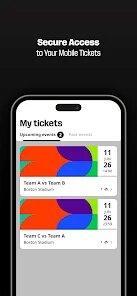
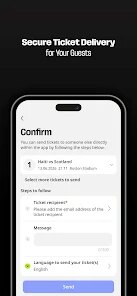
Once you're logged in and have an actual match assigned, the app becomes your central hub. The main screen lists your upcoming matches in a clear, chronological order. Tapping on a specific match reveals the crucial details: the stadium on a map, the gate, the section, row, and seat. The standout feature is the "Transfer Tickets" section. If your friend couldn't get a ticket, you can officially transfer yours to them right here, which is much safer than handing over your phone. Navigating the app is straightforward, though during the initial setup, linking your tickets can feel a bit slow if the server is under heavy load. A practical tip: make sure your phone's brightness is maxed out before you get to the queue, because the QR code scanner at the stadium can be picky in direct sunlight. The experience is very transactional; you're not browsing highlights, you're just managing a key asset for your trip.
After using it for a hypothetical tournament run, my honest take is that it does exactly what it needs to, nothing more, nothing less. Someone who is a die-hard fan and wants to attend multiple matches will find it indispensable; the ticket transfer and digital wallet eliminate the panic of losing a physical ticket. For the casual fan who might attend just one game, it feels like a necessary evil—you need it, but you also likely delete it after the final whistle. Compared to apps like Ticketmaster or StubHub, this one is more restricted but also more secure. You can't resell on a whim, but you also won't get scammed as easily. The main reason someone might keep it installed is for the post-tournament nostalgia, seeing those past matches and tickets as a digital souvenir. The reason to uninstall? It takes up a bit of space, and once the tournament is over, it becomes a digital ghost app with no real purpose until 2030.
features
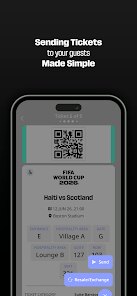
- 🔑 Ticket Transfer and Resale: The FWC2026 app allows you to officially transfer a ticket to another verified user or put it up for official resale through FIFA's platform. This is a huge upgrade over the FIFA 2022 app, which didn't have a streamlined transfer system and often forced fans to rely on unofficial channels with high risk. You can even do this while in line for a snack, which is incredibly handy.
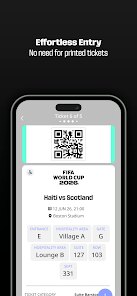
- 📱 Digital-Only Entry: Unlike many event apps that offer both print-at-home and digital options (like Ticketmaster), this app is strictly digital. Your phone becomes your only ticket. This cuts down on fraud and lost tickets entirely, though it also means your phone battery must survive the entire day at the stadium.
- 🗺️ Integrated Match Day Guide: The app bundles your ticket with a map of the stadium, showing your specific gate and seat location relative to concessions and bathrooms. This is more detailed than the general stadium maps you'd find on a generic map app like Google Maps, saving you from wandering around the wrong section before kickoff.
pros
- ✅ Official Source Security: Using the FWC2026 app means you are buying tickets directly from FIFA, not from a third-party reseller like StubHub or Viagogo. This eliminates the risk of counterfeit tickets, which is a massive relief for international travelers spending a lot on a trip.
- ✅ One-Click Entry: The QR code updates every few seconds, making it nearly impossible to screenshot and share. This is much more secure than static barcode apps used by smaller events or venues, ensuring only you can use your ticket at the gate.
- ✅ Ticket Gifting Simplicity: If you want to give your ticket to a friend, the app handles the legal transfer of the ticket to their account. This is much smoother than the manual, often risky, process used by apps like those for concerts or smaller sports leagues, where you might just share a screenshot.
cons
- ❌ Heavy Battery Drain: The app is a real power hog, especially since you need your screen bright for scanning. Unlike a simple PDF ticket, this live app keeps the GPS and screen on, meaning you might need a portable charger for a full day at the stadium. Competitors like the UEFA EURO app handle battery management a bit better.
- ❌ Slow Server During Peak Times: On match day when everyone is trying to load their tickets, the app can lag and take a while to fetch your details. This is frustrating compared to a printed ticket that you just pull out of your pocket. Google Pay or Apple Wallet passes, which load offline, offer more reliability in crowded stadiums.
- ❌ Single Purpose Only: After the tournament, the app becomes completely useless. Unlike an app like Eventbrite, which stores ticket history for various events, this one is a one-time-use app. Once the World Cup ends, it just takes up space on your phone with no lasting value.
Recommended Apps
![]()
Phone Tracker - Phone Locator
Lutech Ltd4.1
![]()
Cartoon Photo Editor
AZ Mobile Software4.5
![]()
Speak to Santa™ - Video Call
North Pole Command Centre Limited4.4![]()
Gay Dating & LGBT Hookup App
Hookup Apps to Hook up Local Dating4.5![]()
Wonder - AI Art Generator
Codeway Dijital3.7![]()
Shazam: Find Music & Concerts
Apple Inc.4.8![]()
Lightroom Photo & Video Editor
Adobe4.5![]()
Crush Love Tester
A.L Studio3.7![]()
Daily Horoscope
Horoscope by Comitic4.8![]()
Kissing Test Calculator
We Love pranks3![]()
Filters for pictures - FaceArt
VysionApps2.8![]()
Pinterest
Pinterest4.5![]()
QR Code Reader Barcode Scanner
Celebrity App Studio3.9![]()
PicSo – Customize Your AI Girl
Meta Insight3.7![]()
Does He Like Me?
KDR Games4.3















Disclaimer
1.AppInfoLibrary does not represent any developer, nor is it the developer of any App or game.
2.AppInfoLibrary provide custom reviews of Apps written by our own reviewers, and detailed information of these Apps, such as developer contacts, ratings and screenshots.
3.All trademarks, registered trademarks, product names and company names or logos appearing on the site are the property of their respective owners.
4. AppInfoLibrary abides by the federal Digital Millennium Copyright Act (DMCA) by responding to notices of alleged infringement that complies with the DMCA and other applicable laws.
5.If you are the owner or copyright representative and want to delete your information, please contact us info@appinfolibrary.com.
6.All the information on this website is strictly observed all the terms and conditions of Google Ads Advertising policies and Google Unwanted Software policy .




























