

Pollo AI: AI Video Generator

1M+
Installs
COCOSOFT TECHNOLOGY PTE. LTD.
Developer
-
Entertainment
Category
-
Everyone
Content Rating
-
support@pollo.ai
Developer Email
-
https://pollo.ai/privacy-policy
Privacy Policy
Screenshots



editor reviews
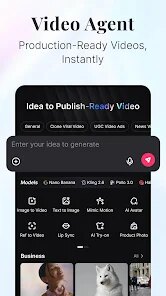
Pollo AI is a mobile app that uses AI to turn text prompts or images into short video clips. It falls into the category of generative AI tools, and you can find it on both the Google Play Store and the App Store. Downloading it is free, and once it's installed, launching the app gives you a clean, modern interface right away. The first impression is that it's pretty straightforward — you don't immediately get hit with a wall of options. You just see a big button to start creating, which makes you feel like you can jump in without any setup. There is no forced registration upfront, but you will stumble upon in-app purchases later if you want to do things like remove watermarks or render higher-resolution videos. Ads do pop up from time to time, especially after generating clips, which can be a bit annoying but not enough to ruin the experience.
When you start actually using Pollo AI, the hands-on experience is smoother than I expected for an app that does something this complex. The onboarding is minimal — you pick whether you want to start from a text prompt, an image, or a reference video. After that, you type in what you want to see, choose a style like cinematic or anime, and hit generate. The app processes the video on the cloud, so you usually wait around 30 seconds to a minute. The interface stays responsive during the wait, and you can easily check your history or tweak another prompt. One small tip: if your initial results look a bit off, try being more descriptive with your prompts, because the AI seems to respond better to specific visual language. The whole flow feels like a mix of simple and unpredictable — sometimes you get something really impressive, other times it's just okay.
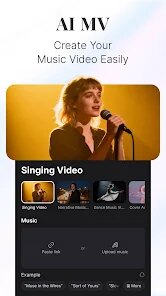
After spending some time with Pollo AI, my personal take is that it's a decent tool for casual creators who want to experiment with AI-generated video without learning complicated software. If you are someone who enjoys making fun, shareable clips for social media or just wants to see what AI can produce, you will probably find it enjoyable. But if you need polished, high-quality outputs for professional work, this app will leave you wanting more. Compared to tools like Runway or Pika Labs, Pollo AI feels more beginner-friendly but less powerful in terms of fine control and output consistency. What makes it stick out is how easy it is to start generating from a phone — no desktop required. I would keep it installed because it's fun for quick experiments, but I can see why someone might uninstall it after the novelty wears off, especially if the ads and in-app purchases get in the way.
features
- 🎥 Text-to-Video Generation: You type in a description, and the AI turns it into a short video clip. Compared to Runway Gen-2, Pollo AI feels a bit more limited in style variety, but the results come out faster on a mobile device.
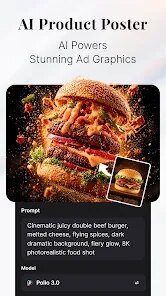
- 🖼️ Image-to-Video Animation: You can upload a photo and make it move, like turning a static landscape into a flowing scene. Pika Labs does something similar, but Pollo AI handles motion transitions more smoothly on the phone.
- 🎬 Style Presets: It offers pre-set visual styles like anime, cinematic, and 3D render. The outstanding feature here is how well the anime style works — it catches details better than what I have seen in similar mobile apps.
pros
- 🎯 Beginner-Friendly Interface: The layout is clean and simple, making it way easier to start than Runway or Pika Labs. Those apps feel more like desktop software crammed into a phone, while Pollo AI feels built for mobile first.
- ⚡ Fast Cloud Processing: Even on a mid-range phone, generating a clip takes about 30 seconds to a minute. Similar apps often take longer or slow your device down, but Pollo AI keeps things snappy.
- ✅ Minimal Commitment to Start: You do not need to sign up or pay upfront to try the basic features. Other apps like Synthesis often push you toward a paid plan before you can even test something properly.
cons
- ⚠️ Watermark on Free Outputs: Every video you generate without paying gets a watermark, which feels a bit aggressive compared to apps like CapCut that let you export cleanly with just a short ad.
- 📉 Inconsistent Output Quality: Not every generation looks good — sometimes faces warp or movements are jittery. Runway Gen-2 tends to give more reliable results when you use similar prompts.
- 🔁 Limited Editing Options: Once the video is generated, you cannot tweak it much. Pika Labs allows you to adjust motion strength or style more freely after the first render, which gives you more control.
Recommended Apps
![]()
Phone Tracker - Phone Locator
Lutech Ltd4.1
![]()
Cartoon Photo Editor
AZ Mobile Software4.5
![]()
Speak to Santa™ - Video Call
North Pole Command Centre Limited4.4![]()
Gay Dating & LGBT Hookup App
Hookup Apps to Hook up Local Dating4.5![]()
Wonder - AI Art Generator
Codeway Dijital3.7![]()
Shazam: Find Music & Concerts
Apple Inc.4.8![]()
Lightroom Photo & Video Editor
Adobe4.5![]()
Crush Love Tester
A.L Studio3.7![]()
Daily Horoscope
Horoscope by Comitic4.8![]()
Kissing Test Calculator
We Love pranks3![]()
Filters for pictures - FaceArt
VysionApps2.8![]()
Pinterest
Pinterest4.5![]()
QR Code Reader Barcode Scanner
Celebrity App Studio3.9![]()
PicSo – Customize Your AI Girl
Meta Insight3.7![]()
Does He Like Me?
KDR Games4.3















Disclaimer
1.AppInfoLibrary does not represent any developer, nor is it the developer of any App or game.
2.AppInfoLibrary provide custom reviews of Apps written by our own reviewers, and detailed information of these Apps, such as developer contacts, ratings and screenshots.
3.All trademarks, registered trademarks, product names and company names or logos appearing on the site are the property of their respective owners.
4. AppInfoLibrary abides by the federal Digital Millennium Copyright Act (DMCA) by responding to notices of alleged infringement that complies with the DMCA and other applicable laws.
5.If you are the owner or copyright representative and want to delete your information, please contact us info@appinfolibrary.com.
6.All the information on this website is strictly observed all the terms and conditions of Google Ads Advertising policies and Google Unwanted Software policy .




























