
Bikii Cloud Game

10M+
Installs
Bikii Game Dev
Developer
-
Entertainment
Category
-
Everyone
Content Rating
-
bikiigame@gmail.com
Developer Email
-
https://www.bikiigame.com/protocol/Bikii/index.html?classify=privacy
Privacy Policy
Screenshots
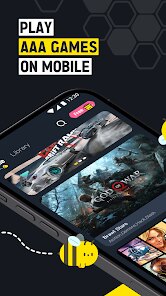
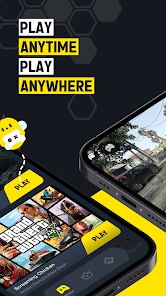


editor reviews
I downloaded Bikii Cloud Game from the Google Play Store because I was curious if it could actually make older games run smoothly on my phone without needing a beefy processor. It's a cloud gaming app, so the heavy lifting happens on their servers, and you basically stream the gameplay to your device. The first thing I noticed after installing it was how small the app size is — under 20 megabytes — which makes sense since it doesn't store any game files locally. You do need to register an account, and I saw some optional in-app purchases listed, but the core service seems to be free to start. The initial launch felt pretty straightforward, though the UI isn't flashy at all. It's functional, but I can see how someone might find it a bit barebones compared to something like GeForce NOW or Xbox Cloud Gaming.
Once I logged in, the main screen showed a short list of available games. The onboarding was basically nonexistent — just a few tooltips popping up here and there. I tried running a few older titles, like some indie platformers, and the setup was dead simple: tap the game, wait for it to load, and you're in. The controls are all screen-based touch buttons, which can feel cramped on a smaller phone display. I did run into a couple of laggy moments, especially when my Wi-Fi signal dipped, and the bitrate took a noticeable hit. One thing I figured out after a few tries was that closing background apps helped the stream stay stable. The big caveat here is the game library feels limited, so you won't find many AAA titles. For daily use, it works okay for casual gaming on the go, but I wouldn't rely on it for anything that needs quick reflexes or high precision.
After spending a week with Bikii Cloud Game, I think it's best suited for people who just want to test cloud gaming without any financial commitment or who own a very low-end phone. If you're used to the polish of something like Nvidia's service, you'll probably be disappointed by the smaller selection and occasional streaming hiccups. What sets it apart from other cloud gaming apps is how lightweight it is — it doesn't demand a lot from your device at all. Honestly, I kept it installed because it's small and doesn't drain much battery, but I can see myself uninstalling it later if the library doesn't grow. It's a decent entry-level option, but not a replacement for more established rivals.
features
- 🎮 The game selection is very limited — Bikii Cloud Game only offers a handful of older or indie titles, while GeForce NOW gives you access to hundreds of popular games, including many AAA releases. This makes it hard to find something fresh to play.
- 🎮 Control customization is practically nonexistent — you get a fixed set of on-screen buttons that can't be remapped or resized. In contrast, services like Xbox Cloud Gaming let you adjust control layouts, which makes a big difference when using different phone sizes.
- 🎮 The streaming quality degrades quickly with unstable internet — even a small dip in Wi-Fi speed causes noticeable lag and pixelation. GeForce NOW handles network fluctuations much better, keeping the stream smooth for longer.
- 🎮 Account registration is mandatory before you see the game list — you can't browse the available games without signing up first. Steam Link, for example, lets you explore options on your PC before committing to any account setup.
pros
- 🌟 The app file size is tiny — under 20 MB, which is perfect for phones with limited storage. GeForce NOW takes up around 150 MB, making Bikii much more lightweight for quick testing.
- 🌟 No subscription fee is required to start playing — you can jump into a game immediately without paying anything upfront. Xbox Cloud Gaming requires an Ultimate Game Pass membership, so Bikii is more budget-friendly for casual users.
- 🌟 It works decently on older smartphones — thanks to the low system requirements, you don't need a flagship device to get a playable experience, unlike some other cloud gaming apps that demand newer hardware.
cons
- 🔴 The game library feels too small for regular use — after a few days, I ran out of titles that interested me. Services like GeForce NOW update their catalog weekly, making them feel more alive.
- 🔴 The touch controls lack precision — for fast-paced games, the buttons feel unresponsive at times. Steam Link's controller support is way more reliable, even for wireless setups.
- 🔴 There's no option to adjust video quality manually — you're stuck with whatever bitrate the app decides. Xbox Cloud Gaming gives you more control over resolution and performance settings.
- 🔴 The lack of official communication about updates makes the app feel abandoned — I couldn't find patch notes or roadmaps, which makes me hesitant to invest time in it. Other cloud gaming platforms provide regular developer updates.
Recommended Apps
![]()
Phone Tracker - Phone Locator
Lutech Ltd4.1
![]()
Cartoon Photo Editor
AZ Mobile Software4.5
![]()
Speak to Santa™ - Video Call
North Pole Command Centre Limited4.4![]()
Gay Dating & LGBT Hookup App
Hookup Apps to Hook up Local Dating4.5![]()
Wonder - AI Art Generator
Codeway Dijital3.7![]()
Shazam: Find Music & Concerts
Apple Inc.4.8![]()
Lightroom Photo & Video Editor
Adobe4.5![]()
Crush Love Tester
A.L Studio3.7![]()
Daily Horoscope
Horoscope by Comitic4.8![]()
Kissing Test Calculator
We Love pranks3![]()
Filters for pictures - FaceArt
VysionApps2.8![]()
Pinterest
Pinterest4.5![]()
QR Code Reader Barcode Scanner
Celebrity App Studio3.9![]()
PicSo – Customize Your AI Girl
Meta Insight3.7![]()
Does He Like Me?
KDR Games4.3















Disclaimer
1.AppInfoLibrary does not represent any developer, nor is it the developer of any App or game.
2.AppInfoLibrary provide custom reviews of Apps written by our own reviewers, and detailed information of these Apps, such as developer contacts, ratings and screenshots.
3.All trademarks, registered trademarks, product names and company names or logos appearing on the site are the property of their respective owners.
4. AppInfoLibrary abides by the federal Digital Millennium Copyright Act (DMCA) by responding to notices of alleged infringement that complies with the DMCA and other applicable laws.
5.If you are the owner or copyright representative and want to delete your information, please contact us info@appinfolibrary.com.
6.All the information on this website is strictly observed all the terms and conditions of Google Ads Advertising policies and Google Unwanted Software policy .