Hearing Age

50+
Installs
Mobile Solutions Tech
Developer
-
Entertainment
Category
-
Everyone
Content Rating
-
respekta.mobilesolutions@gmail.com
Developer Email
-
https://mobile-app.pl/HearingAgePrivacy
Privacy Policy
Screenshots
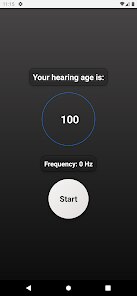
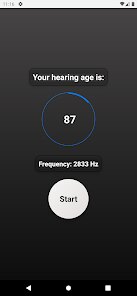
editor reviews
Hearing Age is a mobile app that tests how well your ears can pick up high-frequency sounds. It essentially turns your phone into a quick hearing screener. Most people download it out of simple curiosity — you see a friend post their result or just wonder if you can still hear that mosquito ringtone teenagers used. The first time you open it, you get a very clean, almost clinical interface with a big start button. No fluff, no tutorial video, just a simple test waiting for you. It's a free download on both Google Play and the App Store, though I noticed after the first few tests it prompts you to unlock additional frequency ranges or detailed reports through small in-app purchases.
When you actually run the test, the experience is straightforward. You put on headphones — and seriously, headphones matter here because the phone speaker gives a totally different result. The app plays tones at different frequencies, and you need to tap the screen when you hear something. The main action is just listening and tapping, which gets repetitive after a minute. The onboarding is zero, which is fine, but what caught me off guard is that the frequencies jump around randomly, so you can't cheat by predicting the next tone. After the test, it spits out an "ear age" number. One small tip: make sure you are in a quiet room, or your "age" will look way older than you actually are. The whole thing takes maybe two minutes, which is both the best and worst part — it's quick enough to do again, but you wish it gave a bit more feedback on the results.
After using it for a couple of weeks, I think this app is perfect for someone who just wants a quick ego check or a fun party trick. It's not a medical tool, and it shouldn't be treated like one. Compared to something like Mimi Hearing Test, which feels more clinical and gives you a full audiogram, Hearing Age is the fast food version — less detail, more instant gratification. I could see someone keeping it installed to track changes over months, but most people will run the test twice, share the screenshot, and delete it. It's also limited by your phone's hardware; cheap earbuds will make you feel deaf. What makes it different from similar apps is the gamified "age" result — there's something oddly satisfying about telling your friend their ears are 40 when they are 25.
features
- 👂 The hearing test is incredibly fast — you can complete it in under two minutes. Unlike Audicus or Mimi, which drag the test out with more tones and longer intervals, Hearing Age gets straight to the point. You tap or swipe when you hear a tone, and within 90 seconds you get your result. It's designed for the impatient modern user.
- 👂 The "ear age" result is the standout feature. Instead of showing you raw frequency data like most hearing apps do, it translates your performance into a relatable number. A 30-year-old with good hearing might get an ear age of 22, which feels rewarding. It turns an otherwise dry medical metric into something shareable.
- 👂 The app works completely offline after the initial download. You do not need Wi-Fi or mobile data to run the test, which is rare among hearing test tools. Most competitors require account creation or cloud processing, but this app keeps everything local on your device.
pros
- 👍 No registration or sign-up barrier — you open the app and start testing immediately. Mimi Hearing Test forces you to create an account to see results, while Hearing Age just shows you the number.
- 👍 Lightweight and simple interface — the app is barely 20MB, so it downloads fast and runs smoothly on older phones. uHear feels heavier in comparison.
- 👍 The frequency range goes higher than most competitors, reaching up to 22kHz, which matters for younger users who want to test their upper limits.
cons
- 👎 Results lack medical accuracy — the "age" is a rough estimate at best. Mimi Hearing Test provides a proper audiogram with decibel levels per frequency, while Hearing Age just gives a single number with no breakdown.
- 👎 The in-app purchase wall is annoying — after three free tests, the app blocks detailed frequency analysis unless you pay. Free alternatives like Audiogram do not limit test counts.
- 👎 No calibration option — the app assumes your headphones have a flat frequency response, which is rarely true. Cheap earbuds will distort results badly, and there is no way to compensate for that.
Recommended Apps
![]()
Phone Tracker - Phone Locator
Lutech Ltd4.1
![]()
Cartoon Photo Editor
AZ Mobile Software4.5
![]()
Speak to Santa™ - Video Call
North Pole Command Centre Limited4.4![]()
Gay Dating & LGBT Hookup App
Hookup Apps to Hook up Local Dating4.5![]()
Wonder - AI Art Generator
Codeway Dijital3.7![]()
Shazam: Find Music & Concerts
Apple Inc.4.8![]()
Lightroom Photo & Video Editor
Adobe4.5![]()
Crush Love Tester
A.L Studio3.7![]()
Daily Horoscope
Horoscope by Comitic4.8![]()
Kissing Test Calculator
We Love pranks3![]()
Filters for pictures - FaceArt
VysionApps2.8![]()
Pinterest
Pinterest4.5![]()
QR Code Reader Barcode Scanner
Celebrity App Studio3.9![]()
PicSo – Customize Your AI Girl
Meta Insight3.7![]()
Does He Like Me?
KDR Games4.3















Disclaimer
1.AppInfoLibrary does not represent any developer, nor is it the developer of any App or game.
2.AppInfoLibrary provide custom reviews of Apps written by our own reviewers, and detailed information of these Apps, such as developer contacts, ratings and screenshots.
3.All trademarks, registered trademarks, product names and company names or logos appearing on the site are the property of their respective owners.
4. AppInfoLibrary abides by the federal Digital Millennium Copyright Act (DMCA) by responding to notices of alleged infringement that complies with the DMCA and other applicable laws.
5.If you are the owner or copyright representative and want to delete your information, please contact us info@appinfolibrary.com.
6.All the information on this website is strictly observed all the terms and conditions of Google Ads Advertising policies and Google Unwanted Software policy .