Google Maps Go

500,000,000+
Installs
Google LLC
Developer
-
Travel & Local
Category
-
Rated for 3+
Content Rating
-
apps-help@google.com
Developer Email
-
http://www.google.com/policies/privacy
Privacy Policy
Screenshots
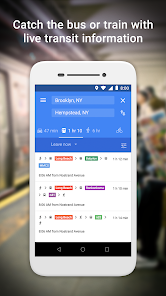

editor reviews
I first stumbled upon Google Maps Go when I was running out of storage on my old phone. It's essentially a lightweight, web-app version of the standard Google Maps, designed specifically for devices with limited memory or slower internet connections. You can download it for free from the Google Play Store, and it doesn't require a heavy install process or even a Google account to start navigating. The moment I launched it, I was surprised by how clean and snappy it felt—there's no fancy splash screen or unnecessary animations. It just loads a simple map interface almost instantly, which was a huge relief compared to the full app that sometimes took forever to open on my budget device.
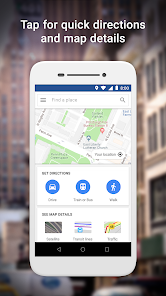
Once I started using it, the experience felt surprisingly familiar yet stripped-down. The onboarding is minimal—you're basically dropped straight onto the map, and you can start searching for places right away. I typed in a nearby coffee shop, and it found it quickly, though the results screen looked more like a text list than a rich card layout. Tapping a location shows basic info like address, hours, and a phone number, but you won't see user reviews or photos unless you tap further. For turn-by-turn navigation, the directions appear clearly, but the voice guidance isn't as smooth as the main app; it sometimes stutters a bit. A practical tip I picked up: if you need to save a location, you can bookmark it by long-pressing on the map, which works smoothly. I did notice that refreshing the map took a little longer when I was in a weaker signal area, which was a bit frustrating.
After living with it for a few weeks, I think Google Maps Go is best suited for someone with an older or low-end Android phone, or anyone who just hates bloatware. If you're a heavy user who needs real-time traffic updates, lane guidance, or offline map downloads, this app will feel too basic—I'd recommend sticking with the full Google Maps or maybe OsmAnd if you want offline features. What makes Maps Go stand out is how it manages to offer core navigation without hogging your battery or storage. I ended up keeping it installed on my primary phone as a backup when I need a quick direction but don't want to drain battery. That said, I can see someone uninstalling it if they value in-app reviews or detailed place info, since that part feels very cut down.
features
- 🗺️ Lightweight & fast: Unlike the full Google Maps app that can be a resource hog, Maps Go loads almost instantly even on 1GB RAM devices. The battery drain is minimal, making it ideal for long trips when you can't charge.
- 🗺️ No account required: You can use it without signing in to Google. This is a huge plus if you value privacy or just don't want to link your location history to your account. The full app pushes login much harder.
- 🗺️ Core directions work well: Despite being stripped down, it still provides reliable driving, walking, and transit directions. In comparison, older versions of Here WeGo (another lightweight option) sometimes struggle with transit data in smaller cities. Maps Go stays consistent even in mid-sized towns.
- 🗺️ Offline search is decent: While you can't download full offline maps like in Google Maps or Maps.me, your recent search results are cached. If you lose signal mid-drive, you can still access the route you started, which beats many competitors that require constant internet.
pros
- ✅ No bloatware: The app is purely navigation. Unlike Waze which fills the screen with ads, user reports, and social features, Maps Go stays focused on getting you from point A to point B without distractions.
- ✅ Works on old devices: I tested it on a 2016 phone with Android 6, and it ran perfectly. The full Google Maps app often lags there, while OsmAnd feels too clunky. Maps Go is the smoothest option for hardware-strapped users.
- ✅ Quick search results: In my experience, it returns place names and addresses as fast as the main app. For pure lookup speed, it beats Even Maps (another lightweight app) by a few seconds, which makes a difference when you're in a hurry.
cons
- ❌ No lane guidance: Unlike the standard Google Maps or Waze, Maps Go won't tell you which lane to be in before an exit. I missed a turn because I wasn't sure which lane to take, which never happened with the full app.
- ❌ Limited offline functionality: You can't download areas for offline use like in Google Maps or Maps.me. If you're going to a remote area, this app is not reliable, while Maps.me excels there with full offline maps.
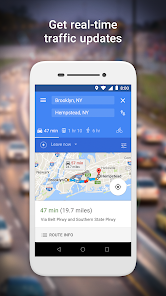
- ❌ No real-time traffic rerouting: The app shows traffic conditions, but it doesn't automatically suggest an alternate route when there's a jam. Waze constantly does this, and even the full Google Maps app is far better at dynamic rerouting.
- ❌ Sparse place information: Reviews, photos, and menus are buried deeper than in the main Google Maps. For exploring new restaurants, I often had to switch to the full app, which was annoying.
Recommended Apps
![]()
Brainzzot Universe: Prank Call
TeH Software0
![]()
Depression Test
Inquiry Health LLC4.5
![]()
eBay online shopping & selling
eBay Mobile4.6![]()
Weather Radar & Weather Live
Avn Global Application4![]()
Amazon Alexa
Amazon Mobile LLC4.5![]()
My Name Meaning
Capital Aerrow0![]()
Parallax: 4K 3D Live Wallpaper
Nebuchadnezzar DOO4.6![]()
Testerup: Test & Earn Rewards
aestimium GmbH4.2![]()
Prank App - Funny Prank Sounds
Trusted Apps & Utilities Tools 20244.4![]()
Curso Inglés, Aprender Inglés
TomatoTB4.9![]()
Hair Clipper Prank: Fun Sounds
Braly JSC4![]()
Funny Prank: Monster Sound
Mirai Global Publishing0![]()
PrankGen - Funny Prank Sounds
DATONG FUN3.8![]()
Pixelup - AI Photo Enhancer
Codeway Dijital3.9![]()
Football Wallpaper HD 4K
Orange Infotech Studio4.6