

FishAngler: Fishing Guide App

1M+
Installs
FishAngler, LLC
Developer
-
Sports
Category
-
Teen
Content Rating
-
support@fishangler.com
Developer Email
-
https://www.fishangler.com/privacy/
Privacy Policy
Screenshots
editor reviews
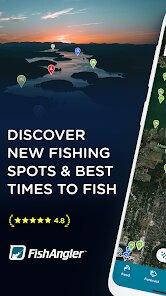
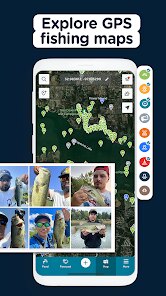
FishAngler is a dedicated fishing companion app that sits squarely in the outdoor sports and navigation category. You mainly use it to find fishing spots, log your catches, check local weather conditions, and connect with other anglers. It's not a game or a generic map app; it's built specifically for people who fish. When you first download it from Google Play or the App Store (it's free to install, though it has several in-app subscriptions and optional purchases), the initial impression is a map covered in little icons representing different fishing spots. It can feel a bit busy at first, but right away, it communicates that this is a serious tool, not just a social network for fish pictures.
After launching the app, you're prompted to create a free account, which takes about a minute. The main screen is a map view, and you're encouraged to tap on nearby markers to see what fish species have been caught there. The real hands-on experience starts when you're actually on the water. You can use the “Start Fishing” button to log the time, location, weather, and the fish you catch. This data gets added to your personal log and also feeds into the community reports. The interface is generally smooth, but sometimes loading the detailed reports can lag if you're in a remote area with weak signal. One practical tip: use the weather overlay before heading out, because it updates hourly and is often more accurate than your phone's default weather app.
After using FishAngler for several months, I've found it most useful for anglers who fish in public waters and want to keep a detailed fishing diary. It's less helpful for private pond owners or people who only fish in stocked ponds where spots are already known. What sets FishAngler apart from apps like iAngler or Anglr is the sheer density of user-submitted data; many lakes and coastal regions have hundreds of logs. The community aspect can be a double-edged sword, though. Some users post incomplete reports or old data, which can mislead you. I personally keep it installed because the weather and moon phase tracking save me time before fishing trips, but I can see someone uninstalling it if they rarely fish in new areas or don't care about logging.
features
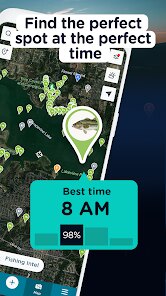
- 🗺️ Community-Driven Fishing Map: Unlike generic map apps like Google Maps, FishAngler's map is entirely curated by anglers. Users mark exact spots, include notes on bait used, water depth, and even photos of the catch. This turns the map into a living logbook rather than just a location marker.
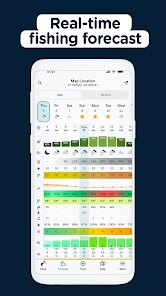
- 🔔 Real-Time Bite Alerts: The app integrates weather and solunar data to push notifications when fish activity is predicted to be high. This feature stands out because it uses your local sunrise/sunset and moon phases, not just generic weather reports like Weather Underground or Fishbrain typically offer.
- 📸 In-App Catch Logging with Photo Verification: While many fishing apps let you log catches, FishAngler adds optional photo verification, which builds trust in the community data. This is more reliable than apps like My Fishing Log where anyone can claim a catch without proof.
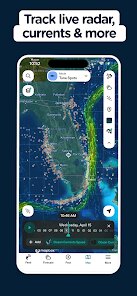
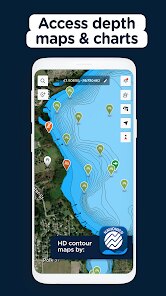
- 🌡️ Hyper-Local Water Condition Reports: FishAngler pulls data from nearby weather stations and buoys to show surface water temperature, wave height, and wind direction directly on the map. This is something even boating apps like iMenela don't offer in a fishing-specific context.
pros
- 👍 More Detailed Community Data Than Fishbrain: FishAngler's user-generated spot data includes depth readings, seasonal catch trends, and even local fishing regulations. Fishbrain gives you basic catch locations and species, but FishAngler goes deeper with seasonal trend graphs.
- 👍 Better Trip Logging Than My Fishing Log: You can save each fishing trip as a full record including weather, tide, bait used, and notes. My Fishing Log makes you manually type everything, whereas FishAngler auto-fills weather data from your GPS location.
- 👍 Seamless Social Sharing Without Spam: Sharing your catch to Instagram or Facebook works without extra steps. Other fishing apps like Anglr force you to use their internal social feed first, which feels clunky.
cons
- 👎 Premium Paywall Blocks Key Data: The free version lets you see basic spot markers, but you can't view detailed catch reports, photos, or water depth charts without a subscription. Fishbrain offers more free features for casual users.
- 👎 Cluttered Map Interface: With too many user markers, the map can become overwhelming visually. Zooming in helps, but it's still not as clean as iAngler's minimalist design.
- 👎 Inconsistent Report Accuracy: Because data is user-submitted, some spots are months old or inaccurate. Apps like Fishidy (now part of Fishbrain) use verified data from state agencies, which feels more trustworthy for new anglers.
Recommended Apps
![]()
Phone Tracker - Phone Locator
Lutech Ltd4.1
![]()
Cartoon Photo Editor
AZ Mobile Software4.5
![]()
Speak to Santa™ - Video Call
North Pole Command Centre Limited4.4![]()
Gay Dating & LGBT Hookup App
Hookup Apps to Hook up Local Dating4.5![]()
Wonder - AI Art Generator
Codeway Dijital3.7![]()
Shazam: Find Music & Concerts
Apple Inc.4.8![]()
Lightroom Photo & Video Editor
Adobe4.5![]()
Crush Love Tester
A.L Studio3.7![]()
Daily Horoscope
Horoscope by Comitic4.8![]()
Kissing Test Calculator
We Love pranks3![]()
Filters for pictures - FaceArt
VysionApps2.8![]()
Pinterest
Pinterest4.5![]()
QR Code Reader Barcode Scanner
Celebrity App Studio3.9![]()
PicSo – Customize Your AI Girl
Meta Insight3.7![]()
Does He Like Me?
KDR Games4.3















Disclaimer
1.AppInfoLibrary does not represent any developer, nor is it the developer of any App or game.
2.AppInfoLibrary provide custom reviews of Apps written by our own reviewers, and detailed information of these Apps, such as developer contacts, ratings and screenshots.
3.All trademarks, registered trademarks, product names and company names or logos appearing on the site are the property of their respective owners.
4. AppInfoLibrary abides by the federal Digital Millennium Copyright Act (DMCA) by responding to notices of alleged infringement that complies with the DMCA and other applicable laws.
5.If you are the owner or copyright representative and want to delete your information, please contact us info@appinfolibrary.com.
6.All the information on this website is strictly observed all the terms and conditions of Google Ads Advertising policies and Google Unwanted Software policy .




























