

Photo Collage Pro

10M+
Installs
Zentertain
Developer
-
Video Players & Editors
Category
-
Rated for 12+
Content Rating
-
Fideoapp@zentertian.net
Developer Email
-
http://getmatchnow.com/policies/privacy.html
Privacy Policy
Screenshots

editor reviews
Photo Collage Pro is a photo editing and collage-making app that landed on my phone after I got tired of the basic grid options in my gallery. It's one of those tools designed specifically for people who want to quickly combine multiple images into a single frame, add some text or stickers, and share the result on social media. I first noticed it on Google Play where it claimed over 10 million downloads, which felt like a decent sign. The download was free, but I braced myself for ads or in-app purchases. After launching it, the first impression was a bit overwhelming—tons of templates, layouts, and customization buttons right there on the homepage. It didn't feel minimal at all. I remember thinking, "Okay, I'll need to spend a few minutes figuring out where everything is."
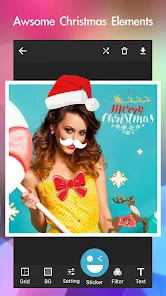
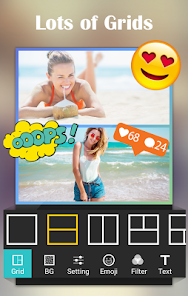
Once I started actually using it, the experience was mixed. Onboarding was simple enough—you pick a template or start from scratch, then drag your photos into the slots. The interface has a lot of buttons, but the main actions are clearly labeled: "Layouts," "Backgrounds," "Stickers," "Text." I tried making a quick collage of vacation photos, and the drag-and-drop felt smooth. One thing that stood out was how easy it was to adjust the spacing between images, something I always struggled with in other apps. But then I hit a confusing moment: applying a filter to one photo affected all of them, and I couldn't figure out how to undo that without restarting. A small practical tip I picked up after a few tries is to save frequently as you go, because the app doesn't autosave your progress. For daily use, it's fine for casual edits, but anyone expecting a polished, seamless workflow might get annoyed.
After a couple of weeks, I have a personal take on it. This app is great for someone who makes a lot of quick collages for Instagram stories or Facebook posts and doesn't mind digging through menus. But if you're someone who needs precision editing or wants to maintain separate control over each photo's filters, you'd probably prefer something like Canva or PicsArt, which offer more granular control. What sets Photo Collage Pro apart is the sheer variety of layouts—it has way more than the basic four-grid options you see in typical free apps. That said, I found the free version's ads intrusive, especially after every save. I kept it installed mainly for the layout library, but I honestly wouldn't pay for the premium version when free competitors like Layout from Instagram exist. It's a decent tool, just not a must-keep for me.
features
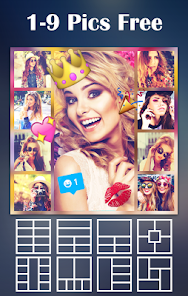
- 📐 The layout library in Photo Collage Pro is genuinely massive. You get hundreds of grid patterns, from simple 2-photo splits to wild 9-photo arrangements with irregular shapes. Canva, by comparison, offers far fewer free collage templates before pushing you into premium. Here, even the free version gives you a solid selection, so you're not locked into boring standard grids.
- 🎨 Background customization goes beyond just picking a solid color. You can use your own photos as backgrounds, apply gradients, or even blur the background to make the main images pop. In PicsArt, achieving a blurred background usually requires extra steps or layers. Photo Collage Pro keeps it straightforward within the collage editor itself.
- 🖼️ The drag-and-drop resizing feels surprisingly fluid. Instead of fixed grid cells, you can adjust margins and cell sizes by simply dragging borders. That's something you don't get in simpler tools like Layout from Instagram, where the grid dimensions are locked once selected.
pros
- ✨ The app loads quickly and doesn't crash even with high-resolution images. Compared to Canva, which can lag on older phones, Photo Collage Pro feels snappier for basic collage tasks.
- 🎯 Sticker and text integration is decent. You get a fair amount of free stickers and fonts without needing to log in or sign up, unlike PicsArt which constantly pushes account creation.
- 📸 Export options are generous. You can save in high quality without watermarks on the free version, which is rare. Many similar apps force a small logo onto your final image.
cons
- 🔇 The ad frequency is high. After every collage save, you're hit with a full-screen video ad. Layout from Instagram has zero ads, making it far less annoying for quick edits.
- 🔄 Undo functionality is badly implemented. If you apply a filter to one photo, it applies to all, and there's no quick "undo" button. Canva handles layer-based editing far better in this regard.
- 📦 The free version's sticker and font library is decent but feels limited after a week. Once you've used the same few star stickers a few times, you'll hit a wall unless you pay.
- 🎛️ Photo editing tools are almost nonexistent outside collage mode. You can't do basic adjustments like brightness or contrast on a single image before placing it in the grid, something PicsArt handles smoothly.
Recommended Apps
![]()
Phone Tracker - Phone Locator
Lutech Ltd4.1
![]()
Cartoon Photo Editor
AZ Mobile Software4.5
![]()
Speak to Santa™ - Video Call
North Pole Command Centre Limited4.4![]()
Gay Dating & LGBT Hookup App
Hookup Apps to Hook up Local Dating4.5![]()
Wonder - AI Art Generator
Codeway Dijital3.7![]()
Shazam: Find Music & Concerts
Apple Inc.4.8![]()
Lightroom Photo & Video Editor
Adobe4.5![]()
Crush Love Tester
A.L Studio3.7![]()
Daily Horoscope
Horoscope by Comitic4.8![]()
Kissing Test Calculator
We Love pranks3![]()
Filters for pictures - FaceArt
VysionApps2.8![]()
Pinterest
Pinterest4.5![]()
QR Code Reader Barcode Scanner
Celebrity App Studio3.9![]()
PicSo – Customize Your AI Girl
Meta Insight3.7![]()
Does He Like Me?
KDR Games4.3















Disclaimer
1.AppInfoLibrary does not represent any developer, nor is it the developer of any App or game.
2.AppInfoLibrary provide custom reviews of Apps written by our own reviewers, and detailed information of these Apps, such as developer contacts, ratings and screenshots.
3.All trademarks, registered trademarks, product names and company names or logos appearing on the site are the property of their respective owners.
4. AppInfoLibrary abides by the federal Digital Millennium Copyright Act (DMCA) by responding to notices of alleged infringement that complies with the DMCA and other applicable laws.
5.If you are the owner or copyright representative and want to delete your information, please contact us info@appinfolibrary.com.
6.All the information on this website is strictly observed all the terms and conditions of Google Ads Advertising policies and Google Unwanted Software policy .




























