TeraBox: 1TB Cloud & AI Space

100M+
Installs
Flextech Inc.
Developer
-
Productivity
Category
-
Everyone
Content Rating
-
helpdesk@terabox.com
Developer Email
-
https://www.terabox.com/box-static/disk-system/html/wap_privacy.html
Privacy Policy
Screenshots


editor reviews
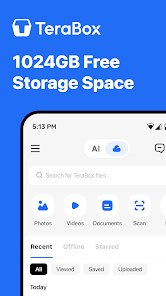
TeraBox is a cloud storage app from Flextech Inc. that offers a massive 1TB of free space, which is honestly the first thing that grabs your attention. It's basically a file backup and syncing tool, but the sheer amount of free storage makes it stand out right away. On Google Play, it's been downloaded over 500 million times, and you can grab it for free without needing to pay a cent upfront. When you first open the app, the interface is clean and straightforward, though the promise of all that free space does come with some caveats like ad banners and occasional prompts to upgrade. Still, that first impression is pretty impressive for anyone running out of room on their phone.
After you start using TeraBox, the actual experience is a bit of a mixed bag. The onboarding process is simple—you just sign up with an email or phone number, and you're in. The main screen shows your files, a "Photos" tab, and a "Videos" tab, making it easy to upload content from your gallery. Uploading a bunch of photos or videos feels fast, and you can even back up your entire camera roll with one tap. However, the free version limits video playback to 720p unless you pay, and the download speeds can feel slow during peak times. One practical tip: you can use the built-in file manager to sort and delete duplicates, which saves space. There's also an AI-powered search tool that can find images by description, like "beach sunset," which works surprisingly well, though it's not perfect. Navigating between tabs feels smooth, but the constant ads pop up enough to get annoying after a while.
After using TeraBox for a few weeks, I can see why people keep it installed, but also why some might ditch it. It's a solid choice if you're a heavy photo taker or someone who needs to hoard files without paying for Google Drive or iCloud. The 1TB free offer is genuinely unmatched—Dropbox and OneDrive only give you about 5GB and 5GB for free, respectively. But the trade-offs are real: ads, slow downloads unless you pay, and video quality caps can frustrate power users. Who would actually enjoy this? Casual users who just want to back up their phone's camera roll without thinking about storage limits. Who wouldn't need it? Creators or professionals who need reliable, fast access to large files—they'd be better off with a paid service. What makes TeraBox different from similar apps is the sheer storage value at a free price point. I'd probably keep it installed for backup but would uninstall if I got tired of the ads and slow speeds. It's a fair deal, but not a perfect one.
features
- 🚀 Massive 1TB free storage: This is the killer feature that sets TeraBox apart from every major cloud storage competitor. Google Drive gives you 15GB for free, and Dropbox offers only 2GB, but TeraBox hands you a full terabyte at no cost. It feels almost too good to be true, and for most users, it's genuinely useful for backing up years of photos, videos, and documents.
- 🤖 AI-powered image search: The app lets you search for photos using natural language descriptions, like "dog in the park," and the AI actually finds relevant images from your cloud storage. It's not as polished as Google Photos' AI, but it works well enough for basic queries and saves you from scrolling through endless folders.
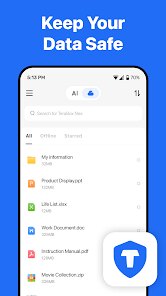
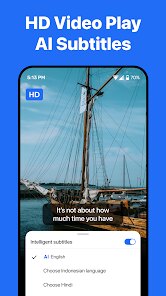
- 📁 Built-in file management and video player: TeraBox includes a file manager that lets you sort, move, and delete files directly in the app. The video player supports 720p streaming for free, which is decent for casual viewing, though higher resolutions are locked behind a paid subscription. This makes it a handy all-in-one storage and playback tool.
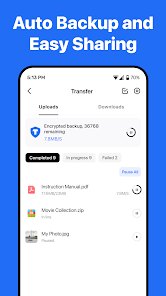
- 🔄 Automatic camera backup: You can set TeraBox to automatically back up new photos and videos from your phone's gallery. This feature runs quietly in the background and works on both iOS and Android, making it a set-it-and-forget-it solution for preserving your memories.
pros
- 🎯 Unbeatable free storage size: Compared to Google Drive's 15GB and OneDrive's 5GB, TeraBox's 1TB free offer is a game-changer for users who need space without paying. It's the main reason millions download it.
- ⚡ Fast upload speeds for smaller files: Uploading a few dozen photos or short videos feels nearly instant, often faster than Dropbox's free tier, which throttles uploads on basic accounts.
- 📱 Cross-platform simplicity: The app works smoothly on both Android and iOS, unlike some competitors like Mega, which can feel clunky on mobile. The interface is unified and easy to navigate.
- 🔍 Useful AI search feature: This feature is more advanced than what you get in free tiers of Google Drive or Box, which rely on basic keyword matching rather than visual recognition.
cons
- 📢 Too many ads: The free version bombards you with full-screen ads after uploads and banner ads at the bottom. Google Drive and OneDrive are completely ad-free on free plans, making TeraBox feel cheap and intrusive.
- 🐢 Slow download speeds: Downloading large files on the free tier often takes forever, especially compared to Dropbox, which offers faster transfers even on basic accounts. It makes restoring backups a chore.
- 🎥 Limited video quality: Free users are capped at 720p streaming, and there's no option for higher resolution without paying. Services like Google Photos and iCloud let you view original quality (at lower free storage limits).
- ❓ Questionable privacy policies: In the past, TeraBox had concerns about data usage and ads targeting user content. This feels less trustworthy than Apple's iCloud or Google Drive, which have more transparent privacy practices.
Recommended Apps
![]()
Brainzzot Universe: Prank Call
TeH Software0
![]()
Depression Test
Inquiry Health LLC4.5
![]()
eBay online shopping & selling
eBay Mobile4.6![]()
Weather Radar & Weather Live
Avn Global Application4![]()
Amazon Alexa
Amazon Mobile LLC4.5![]()
My Name Meaning
Capital Aerrow0![]()
Parallax: 4K 3D Live Wallpaper
Nebuchadnezzar DOO4.6![]()
Testerup: Test & Earn Rewards
aestimium GmbH4.2![]()
Prank App - Funny Prank Sounds
Trusted Apps & Utilities Tools 20244.4![]()
Curso Inglés, Aprender Inglés
TomatoTB4.9![]()
Hair Clipper Prank: Fun Sounds
Braly JSC4![]()
Funny Prank: Monster Sound
Mirai Global Publishing0![]()
PrankGen - Funny Prank Sounds
DATONG FUN3.8![]()
Pixelup - AI Photo Enhancer
Codeway Dijital3.9![]()
Football Wallpaper HD 4K
Orange Infotech Studio4.6