Ace Hardware

1M+
Installs
Ace Hardware Corporation
Developer
-
Shopping
Category
-
Everyone
Content Rating
-
carecenter@acehardware.com
Developer Email
-
http://www.acehardware.com/helpdesk/index.jsp?display=safety&subdisplay=privacy
Privacy Policy
Screenshots
editor reviews
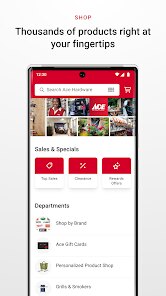
I stumbled upon the Ace Hardware app while looking for a way to order some paint without having to make a special trip to the store. It's basically the mobile version of the well-known hardware store chain, so you can browse their massive inventory of tools, lawn and garden supplies, and home improvement items right from your phone. After downloading it from the Google Play store (it's free, by the way), I opened it up and was honestly a bit surprised by how clean it looked. There wasn't a ton of clutter, and the search bar was right at the top. You do have to create an account to save your favorite store or check out, but it only took me a minute. I noticed there are some in-app purchases, obviously for the products you buy, but I didn't see any annoying ads popping up while I was scrolling.
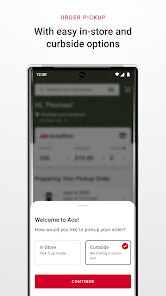
Once I started using it, the hands-on experience was pretty straightforward. The onboarding is just a quick tutorial that shows you how to scan barcodes in the store or check your loyalty points. For my paint order, I typed in the color code, added the gallon I wanted to my cart, and checked out. One slightly confusing moment was picking the right store for pickup—it defaults to your “home” store, but you can change it, which saved me from driving to the wrong location. The interface feels smooth, but I did get a little frustrated trying to figure out if an item was in stock; you have to tap into the product page rather than seeing it on the search results. Overall, it's simple enough for a quick purchase or price check while you're in the aisle.
After using it for a few weeks, my personal take is that this app works best for loyal Ace shoppers or DIYers who like to order ahead. It isn't really for serious contractors who need bulk pricing or heavy-duty tools (I head to Home Depot for that). What makes it different from apps like Lowe's is how much it leans into local store inventory and the “Helpful Place” vibe. I kept it installed because it's handy for those small weekend projects, but I can see someone uninstalling it if they prefer just walking into a store without planning. It's decent, but not life-changing.
features
- 🔨 Store Locator & Local Inventory: Unlike Amazon's general approach, this app directly syncs with your local Ace Hardware store. You can check if something as random as a specific screw size or a bag of mulch is actually in stock before you go. It's super specific and has saved me from wasted trips.
- 🎨 Paint Visualizer: This is the standout feature compared to big box stores like Home Depot. You can take a photo of your room and play with different Ace paint colors right on the wall. It's not perfect, but it's way better than guessing from a tiny swatch.
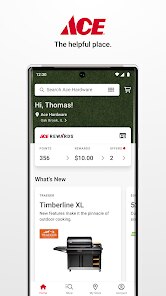
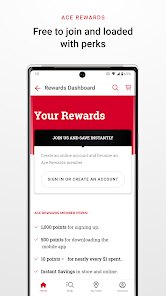
- 🏆 Ace Rewards Integration: The app handles your loyalty points automatically. Every time you make a purchase, the points show up instantly, and you can redeem them directly in the app. It's more seamless than the standard “scan at register” cards.
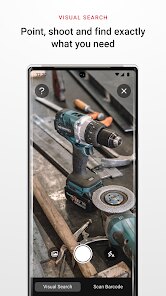
- 📱 Barcode Scanner: When you're standing in the store and need to buy 10 of the same item, you can scan the barcode and add it to a list. It avoids the hassle of physically carrying things around or forgetting what you need.
pros
- 🛠️ The local focus is a major strength. While Lowe's and Home Depot also have apps, Ace's entire model revolves around the unique inventory of your neighborhood store. If you live by an Ace with a solid hardware section, you rarely get frustrated by finding things out of stock.
- 💡 The app is much less pushy with notifications than something like Amazon's shopping app. I get a quick alert when my order is ready for pickup, and that's about it. No daily deals or promotional noise.
- 🧰 The order-ahead and in-store pickup is just easier for smaller items than Lowe's system. I don't have to wait for an employee to find my order in the back—it's usually on a shelf by the register.
cons
- 📉 The search function is weak. If I type “light bulb,” it shows results, but the filtering options (like wattage or type) are not as refined as what you get on True Value or Lowe's apps. You often end up scrolling through irrelevant items.
- ❌ No extended product details. When compared to Amazon's hardware section, the Ace app rarely gives you user reviews or detailed specs. I bought a hose nozzle once that looked fine in the picture but was actually plastic because the description was bare-bones.
- 📦 The app is only for in-store pickup or local delivery; there's no nationwide shipping option for most items. If you need something delivered to your door, you're better off with Amazon, and the app doesn't even suggest a workaround.
- 📱 The user interface sometimes feels sluggish. When scrolling through garden tools or paint colors, the images lag behind a bit, which is annoying compared to the snappy experience in the Home Depot app.
Recommended Apps
![]()
Phone Tracker - Phone Locator
Lutech Ltd4.1
![]()
Cartoon Photo Editor
AZ Mobile Software4.5
![]()
Speak to Santa™ - Video Call
North Pole Command Centre Limited4.4![]()
Gay Dating & LGBT Hookup App
Hookup Apps to Hook up Local Dating4.5![]()
Wonder - AI Art Generator
Codeway Dijital3.7![]()
Shazam: Find Music & Concerts
Apple Inc.4.8![]()
Lightroom Photo & Video Editor
Adobe4.5![]()
Crush Love Tester
A.L Studio3.7![]()
Daily Horoscope
Horoscope by Comitic4.8![]()
Kissing Test Calculator
We Love pranks3![]()
Filters for pictures - FaceArt
VysionApps2.8![]()
Pinterest
Pinterest4.5![]()
QR Code Reader Barcode Scanner
Celebrity App Studio3.9![]()
PicSo – Customize Your AI Girl
Meta Insight3.7![]()
Does He Like Me?
KDR Games4.3















Disclaimer
1.AppInfoLibrary does not represent any developer, nor is it the developer of any App or game.
2.AppInfoLibrary provide custom reviews of Apps written by our own reviewers, and detailed information of these Apps, such as developer contacts, ratings and screenshots.
3.All trademarks, registered trademarks, product names and company names or logos appearing on the site are the property of their respective owners.
4. AppInfoLibrary abides by the federal Digital Millennium Copyright Act (DMCA) by responding to notices of alleged infringement that complies with the DMCA and other applicable laws.
5.If you are the owner or copyright representative and want to delete your information, please contact us info@appinfolibrary.com.
6.All the information on this website is strictly observed all the terms and conditions of Google Ads Advertising policies and Google Unwanted Software policy .