
Transit: Bus & Subway Times

10,000,000+
Installs
Transit, Inc.
Developer
-
Travel & Local
Category
-
Rated for 3+
Content Rating
-
info@transitapp.com
Developer Email
-
https://transit.app/privacy
Privacy Policy
Screenshots
editor reviews
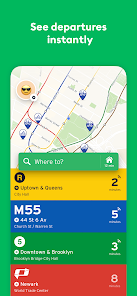
I first downloaded Transit: Bus & Subway Times after getting tired of waiting at bus stops for what felt like forever. It's a real-time public transportation app, the kind that pulls together schedules, live vehicle locations, and route planning for buses, subways, trains, and even ride-shares in some cities. When I opened it for the first time, it asked for my location right away, which made sense, and then it showed me nearby stops and lines in a clean, colorful list. The interface felt pretty modern and not cluttered, which was a nice surprise. It's free to download from both Google Play and the App Store, with over 10 million installs, and while there are in-app purchases for premium features like offline maps and alerts, most people can use the core stuff without paying. There are ads, but they're not too intrusive.
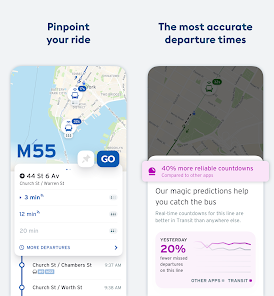
Once I started using it, the hands-on experience was mostly smooth. The app shows you a list of nearby lines and how many minutes until the next arrival, but tapping on a specific route brings up a map with the live vehicle location, which is way better than guessing. I remember one morning I was running late, and I used the “Go” button to plan a trip across town. The app suggested a combination of a bus and a subway, and it even showed me the real-time crowd level on the train car. One thing I noticed is that the onboarding process is super quick—just a few taps to set your home and work stops—but finding the trip history or saved routes took me a minute because they're tucked inside a menu. A practical tip: you can favorite your most-used stops so they appear right on the home screen, which cuts down on tapping around.
After using it for a few weeks, I think it's solid for daily commuters in well-covered cities, but it might not be as useful in smaller towns with sparse transit data. What makes it different from something like Google Maps is the focus solely on transit—there's no maps for driving or biking, but the live tracking feels more accurate and updates faster. I kept it installed because it's less cluttered and more purpose-built than general navigation apps. That said, if you're someone who only uses transit occasionally, you might not need a dedicated app. I uninstalled it once when I switched cities, but for anyone moving to a metro area, it's a keeper.
features
- 🚇 Real-time vehicle tracking shows exactly where your bus or train is on the map, which helps you time your arrival at the stop instead of staring at timetables, a step ahead of Google Maps' estimated times.
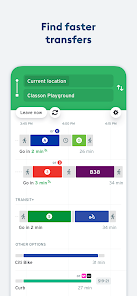
- 🚇 The “Go” trip planner mixes buses, subways, and walking, and it also suggests nearby ride-share or bike-share options in supported cities, giving you a complete door-to-door picture in one list.
- 🚇 Crowdedness predictions on certain lines let you know if the next train car is likely packed, which is super handy during rush hour and not something you get in Citymapper's free version.
pros
- ✅ The live map updates feel faster and more reliable than Google Maps for buses—I've seen buses vanish and reappear on Google, but Transit stays consistent.
- ✅ The clean interface with color-coded lines makes scanning stops and routes super quick, unlike Moovit's sometimes busy layout.
- ✅ It offers a “GO” button that plans an entire trip in one tap after you save your home and work addresses, which is simpler than Apple Maps' step-by-step route selection.
cons
- ❌ The free version shows ads, and while they're not too annoying, Moovit's free tier has fewer interruptions in my experience.
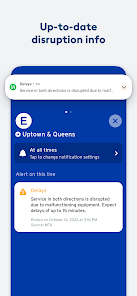
- ❌ Offline maps and push alerts for delays are locked behind a paid subscription, whereas Google Maps gives you offline transit info for free.
- ❌ On my first few trips, I noticed that the “leave now” default doesn't always consider real-time delays well, so I've had to manually check the live tracker to avoid missing a connection.
Recommended Apps
![]()
Phone Tracker - Phone Locator
Lutech Ltd4.1
![]()
Cartoon Photo Editor
AZ Mobile Software4.5
![]()
Speak to Santa™ - Video Call
North Pole Command Centre Limited4.4![]()
Gay Dating & LGBT Hookup App
Hookup Apps to Hook up Local Dating4.5![]()
Wonder - AI Art Generator
Codeway Dijital3.7![]()
Shazam: Find Music & Concerts
Apple Inc.4.8![]()
Lightroom Photo & Video Editor
Adobe4.5![]()
Crush Love Tester
A.L Studio3.7![]()
Daily Horoscope
Horoscope by Comitic4.8![]()
Kissing Test Calculator
We Love pranks3![]()
Filters for pictures - FaceArt
VysionApps2.8![]()
Pinterest
Pinterest4.5![]()
QR Code Reader Barcode Scanner
Celebrity App Studio3.9![]()
PicSo – Customize Your AI Girl
Meta Insight3.7![]()
Does He Like Me?
KDR Games4.3















Disclaimer
1.AppInfoLibrary does not represent any developer, nor is it the developer of any App or game.
2.AppInfoLibrary provide custom reviews of Apps written by our own reviewers, and detailed information of these Apps, such as developer contacts, ratings and screenshots.
3.All trademarks, registered trademarks, product names and company names or logos appearing on the site are the property of their respective owners.
4. AppInfoLibrary abides by the federal Digital Millennium Copyright Act (DMCA) by responding to notices of alleged infringement that complies with the DMCA and other applicable laws.
5.If you are the owner or copyright representative and want to delete your information, please contact us info@appinfolibrary.com.
6.All the information on this website is strictly observed all the terms and conditions of Google Ads Advertising policies and Google Unwanted Software policy .