Google Drive

5,000,000,000+
Installs
Google LLC
Developer
-
Productivity
Category
-
Rated for 3+
Content Rating
-
apps-help@google.com
Developer Email
-
http://www.google.com/policies/privacy
Privacy Policy
Screenshots
editor reviews
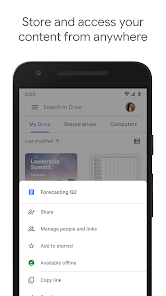
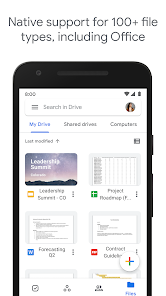
Google Drive is a cloud storage and file synchronization service developed by Google LLC. It's basically a place where you park your files online—documents, photos, videos, pretty much anything you don't want to lose if your phone takes a dive off a counter. People grab it because it comes baked into any Google account, and once you sign in, there's a good chance you've got 15GB free waiting for you. After downloading it from Google Play or the App Store, the first thing that hits you is how clean it looks; it's just a simple list of folders and recent files. No clutter, no loud ads begging for attention. You'd think a storage app might feel boring, but the immediate convenience makes it hard to ignore.
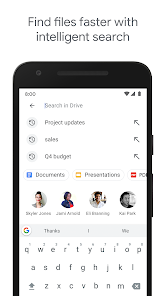
Opening the app for the first time, you're guided through a quick setup that asks if you want to back up photos or enable automatic uploads from your camera roll. Once that's done, the real experience kicks in. You can poke around the grid view, tap a file, and either open it in a separate app or preview it right there. The interface is pretty intuitive—drag to select multiple items, swipe to delete, and use the search bar to find stuff fast. One thing I noticed is that syncing sometimes takes a few seconds longer than expected, especially if you've got a spotty connection. A handy little trick is to star important files so they sit at the top of your list; that's saved me from digging through folders more than once.
After a couple of months of using Google Drive, I'd say it's a solid pick if you already live inside Google's world—Gmail, Google Photos, Docs, all that jazz. Students and remote workers get a lot out of it because sharing files is as easy as copying a link. But if you're just looking for a place to dump a few personal photos, you might find the 15GB limit fills up faster than expected once your emails and backups chip in. What sets it apart from something like iCloud is its cross-platform nature; it works just fine on Android, iOS, and the web without any weird restrictions. I keep it installed mostly for the search, which actually finds stuff even when I can't remember the name. People who hate subscription fees might eventually hit a wall with storage space, but for casual users, it's hard to beat the free tier.
features
- 📂 Google Drive offers 15GB of free storage space right out of the gate, whereas Dropbox gives a mere 2GB unless you upgrade. This makes Drive much more appealing if you're on a budget and need to store a mix of documents and photos without immediately hitting a wall.
- 📂 Its deep integration with Google services like Docs, Sheets, and Slides is seamless; you can create and edit files directly in the app without jumping to another platform. Dropbox relies heavily on third-party apps for similar functionality, which often adds extra steps.
- 📂 The search feature in Drive stands out because it recognizes text inside scanned PDFs and images—something Dropbox requires a paid plan to unlock. That alone means less time hunting for specific content buried in your files.
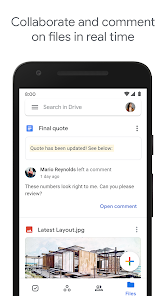
- 📂 Group sharing on Google Drive is straightforward, as you can set permission levels like Viewer or Editor with a couple of taps. OneDrive has similar features, but Drive's link copying feels snappier and less cluttered with extra settings.
pros
- 👍 Cross-platform support is a big win here; Google Drive runs smoothly on Android, iOS, and through any web browser without feeling watered down. iCloud, on the other hand, is locked into Apple's ecosystem and becomes a hassle if you ever switch to a Windows machine.
- 👍 The free 15GB tier is generous compared to both iCloud's 5GB and Dropbox's 2GB, giving you breathing room before paying a dime. For someone hoarding a moderate amount of school work or phone backups, that's a clear advantage.
- 👍 Sharing files with a simple link works even if the other person doesn't have a Google account, while services like iCloud often push you toward registration or app downloads first. This lowers friction when collaborating with friends or colleagues outside your circle.
- 👍 Automatic backup of photos and videos from your camera roll saves memory on your phone, and the organization is better than Dropbox's default folder structure, where everything can feel like a jumble.
cons
- 👎 The 15GB free storage is shared across Google Drive, Gmail, and Google Photos, meaning your emails and photo backups quickly eat into that space. Dropbox keeps its 2GB dedicated just to files, so you don't have that triple drain.
- 👎 Upload speeds can feel inconsistent, especially when syncing large folders over a weaker Wi-Fi connection compared to iCloud, which tends to hold a more stable rate in my testing. This makes bulk uploading a bit of a gamble.
- 👎 Advanced features like offline file editing are locked behind a subscription plan, whereas OneDrive offers offline access for free with its mobile app. Casual users might find this limitation annoying if they work in areas with spotty internet.
- 👎 Privacy concerns linger for some users because Google scans files for indexing, which is great for search but feels invasive compared to Dropbox's zero-knowledge encryption in paid tiers. It's not a dealbreaker for most, but it's worth noting if you handle sensitive documents.
Recommended Apps
![]()
Sider AI: All-in-One Companion
Vidline Inc.4.9

![]()
MyHeritage: Family Tree & DNA
MyHeritage.com4.3![]()
Love Frame - Romantic Couple P
ClickLab Technology4.1![]()
Future Self - Old Age Filter
Vidler Koiter1.6![]()
Pencil Sketch
Dumpling Sandwich Software Inc.4.7![]()
Volume Control Sound Launcher
AtomApplications4.4![]()
Hair Color Changer: Change you
Face & Body Tune Photo Editor SRL3.3![]()
Daily Horoscope
KADO Apps4.2![]()
Cute Wallpapers Cool Wallpaper
DevTeamIn20200![]()
PhotoFunia
Capsule Digital4.7![]()
PayPal - Send, Shop, Manage
PayPal Mobile4.3![]()
Yelp: Food, Delivery & Reviews
Yelp, Inc4.6![]()
Voice Changer - Voice Effects
Dairy App & Notes & Audio Editor & Voice Recorder4.4![]()
Planner 5D: Home Design, Decor
Planner 5D3.8![]()
Fingerprint Scanner Personalit
Zabirko4.3












Disclaimer
1.AppInfoLibrary does not represent any developer, nor is it the developer of any App or game.
2.AppInfoLibrary provide custom reviews of Apps written by our own reviewers, and detailed information of these Apps, such as developer contacts, ratings and screenshots.
3.All trademarks, registered trademarks, product names and company names or logos appearing on the site are the property of their respective owners.
4. AppInfoLibrary abides by the federal Digital Millennium Copyright Act (DMCA) by responding to notices of alleged infringement that complies with the DMCA and other applicable laws.
5.If you are the owner or copyright representative and want to delete your information, please contact us info@appinfolibrary.com.
6.All the information on this website is strictly observed all the terms and conditions of Google Ads Advertising policies and Google Unwanted Software policy .