Amazon Shopping

500,000,000+
Installs
Amazon Mobile LLC
Developer
-
Shopping
Category
-
Rated for 12+
Content Rating
-
feedback-amazon-app-android@amazon.com
Developer Email
-
https://www.amazon.com/gp/help/customer/display.html?ie=UTF8&nodeId=468496
Privacy Policy
Screenshots


editor reviews
Amazon Shopping, developed by Amazon Mobile LLC, is essentially the mobile gateway to the massive online marketplace we all know. It lets you browse, search for, and buy just about anything directly from your phone. For most people, downloading this app is a no-brainer if they already have an Amazon account, as it makes the checkout process much quicker than using a mobile browser. The first time you open it, you're greeted with a familiar but streamlined version of the website, with a persistent search bar at the top and a bottom navigation bar. The homepage feels a bit noisy initially, with a mix of personalized recommendations, deals, and order tracking, but it all makes sense after a minute of tapping around.
Actually using the app day-to-day is where it shines. The onboarding is minimal since most people already know what Amazon is; you just log in with your existing credentials. The main action you'll take is searching for a product, and the predictive text and filter options are incredibly responsive. You can scan a barcode or use visual search, which is surprisingly handy for identifying something you saw in a store. Adding items to your cart is smooth, and the one-click checkout feature is dangerous for my wallet. One small tip I picked up is that you can long-press the cart icon to access the list of saved items from a quick popup, which saves a tap or two. The only confusing moment I had was figuring out how to access my subscribe-and-save items; it's buried a few layers deep in the menu.
After using it for a few weeks, I'd say this app is perfect for anyone who buys stuff online regularly. If you're a casual shopper, the mobile site works fine, but the app's convenience with order tracking and push notifications for delivery updates makes it a keeper for me. What sets it apart from other shopping apps like eBay or Walmart is the sheer depth of inventory and the universal trust in the return process through Amazon's A-to-Z guarantee. I ended up keeping it installed because it just makes my life easier, but I did disable the promotional notifications because they got overwhelming. Someone with a tight budget might uninstall it just to avoid impulse purchases, but for someone like me who values speed and reliability, it's hard to beat.
features
- 🛒 The barcode and image search feature is a game changer. Unlike eBay, where you mostly rely on text descriptions, Amazon Shopping lets you snap a photo of a book cover or scan a barcode from a product you already own to instantly find it or its compatible accessories. It feels almost like magic when you get a match within two seconds.
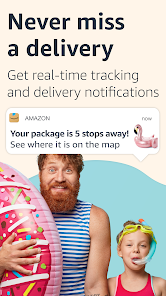
- 🚚 Delivery tracking is integrated right into the main interface. You can see real-time updates on a map for certain orders, which is much more interactive than the plain text updates you get from AliExpress. It gives you a much better sense of when your package will actually show up.
- 💳 The one-click purchase setting, once enabled, reduces checkout to a single tap with zero confirmation screens. This is both a strength and a dangerous convenience compared to the more deliberate checkout process on Target's app, which requires several steps. It's lightning fast if you trust yourself.
- 🤖 Amazon Assistant chat support is embedded directly in the order details page. While not always perfect, having a real person available through the app without needing to call a phone number is a huge upgrade over the email-only support you often find on Wish or Temu.
pros
- 🔒 The return process is incredibly frictionless. Compared to third-party sellers on Walmart, Amazon handles everything through a drop-off label or a QR code at Whole Foods, and the refund appears in your account the moment the carrier scans the package. That level of trust is unmatched.
- 🎯 Personalized recommendations are creepily accurate after a few purchases. Unlike the generic suggestions on Best Buy's app, Amazon's feed genuinely feels like it knows what I need next, often suggesting items I didn't even know I wanted but end up buying.
- ⚡ Speed is the killer feature. Page loads, checkout, and even loading product reviews happen in under a second on a decent connection. The app's performance feels significantly snappier than the clunky experience on the Newegg mobile app, which can lag when loading high-res product galleries.
cons
- 📢 The sheer volume of push notifications is overwhelming out of the box. You get alerts for daily deals, lightning deals, suggested items, and shipping updates, often multiple times per day. Unlike eBay's more respectful notification cadence, Amazon spam feels aggressive until you manually turn most of them off.
- 🔍 Search results can sometimes be flooded with sponsored products or irrelevant listings, making it harder to find exactly what you want. It's worse than Google Shopping in terms of how many paid ads you have to scroll past before seeing organic results.
- 📱 Occasional bugs with the "Add to List" button freezing on slower phones can be frustrating. The interface sometimes hangs after saving an item, which is less common on the Target app which handles list management more smoothly in my experience.
- 🛠️ The "General" section under account settings is a confusing catch-all. Unlike the well-organized settings in the Wish app, Amazon buries important toggles like notifications and address management under vague headers that require multiple taps to find what you need.
Recommended Apps
![]()
Brainzzot Universe: Prank Call
TeH Software0
![]()
Depression Test
Inquiry Health LLC4.5
![]()
eBay online shopping & selling
eBay Mobile4.6![]()
Weather Radar & Weather Live
Avn Global Application4![]()
Amazon Alexa
Amazon Mobile LLC4.5![]()
My Name Meaning
Capital Aerrow0![]()
Parallax: 4K 3D Live Wallpaper
Nebuchadnezzar DOO4.6![]()
Testerup: Test & Earn Rewards
aestimium GmbH4.2![]()
Prank App - Funny Prank Sounds
Trusted Apps & Utilities Tools 20244.4![]()
Curso Inglés, Aprender Inglés
TomatoTB4.9![]()
Hair Clipper Prank: Fun Sounds
Braly JSC4![]()
Funny Prank: Monster Sound
Mirai Global Publishing0![]()
PrankGen - Funny Prank Sounds
DATONG FUN3.8![]()
Pixelup - AI Photo Enhancer
Codeway Dijital3.9![]()
Football Wallpaper HD 4K
Orange Infotech Studio4.6