LastSeen

10M+
Installs
Web-Source Ltd
Developer
-
Finance
Category
-
Everyone
Content Rating
-
info@lastseentracker.com
Developer Email
-
https://lastseentracker.com/privacy
Privacy Policy
Screenshots
editor reviews
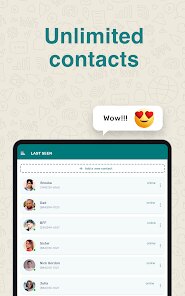
I stumbled across LastSeen by Web-Source Ltd while browsing for ways to track how often I actually checked my own social media habits. It's a utility app that logs when you last opened certain apps or visited specific websites, almost like a personal activity diary without the manual entry. The idea behind it is simple: instead of relying on your phone's vague screen time summary, you get a clean list of recent timestamps. After downloading it from Google Play (it's free, though I spotted some in-app purchase options), the first impression was surprisingly minimal. No flashy tutorial, no sign-up wall—just a plain interface asking for permission to access usage data. That straightforwardness felt refreshing, like an app that respects your time from the get-go.
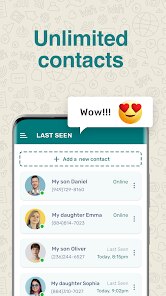
Once I started using it, the hands-on experience turned out to be pretty straightforward. The home screen shows a list of your chosen apps or URLs, each with a timestamp for the last time you opened them. Setting it up took less than a minute: you grant the required permissions (which is mandatory for any app like this), then tap the plus icon to add what you want to monitor. I added Instagram, Chrome, and a couple of news sites. The app then just sits in the background, silently updating each entry whenever you interact with those targets. One small win I noticed was that it doesn't drain battery noticeably—unlike some other monitoring tools that feel heavy. The only slightly confusing part was figuring out why some entries showed “never” at first; turns out you need to open the monitored app once after adding it for the timer to kick in. A small quirk, but easy to work around.
After keeping LastSeen on my phone for a few weeks, my verdict is mixed but mostly positive. For someone who wants a no-fuss way to see how often they open Twitter or Facebook without diving into complex analytics, this is a neat tool. It's much lighter than something like RescueTime, which feels more like a productivity powerhouse with its graphs and alerts. But if you're looking for deep insights—like how much time you spent inside an app, not just the last visit—LastSeen falls short. It's basic by design. I could see myself keeping it installed for a while, but I might uninstall it if I ever feel like I've already got a handle on my habits. It's a niche utility, not a daily driver for most people.
features
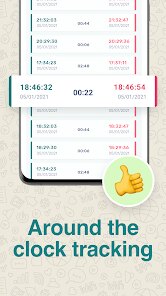
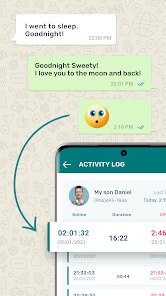
- 📊 Real-time last-opened tracking: Unlike Forest, which gamifies focus but doesn't log specific timestamps, LastSeen gives you a precise record of when you last used an app or visited a site. It's raw data, no fluff—just a list with hours, minutes, and dates. This is perfect if you want to check if you've opened Instagram five minutes ago or five hours ago, something Forest's tree-growing model completely skips.
- 🔗 URL and app monitoring in one place: You're not limited to just apps. LastSeen lets you add specific website URLs, so you can track visits to Twitter's web version or a news portal. That's a standout feature over something like Usage, which focuses solely on installed apps. It feels more flexible for hybrid phone users who toggle between apps and browsers.
- 🧼 No clutter interface: The design is deliberately sparse—no ads bombarding you, no colorful charts trying to tell a story. Just a clean, scrollable timeline. This contrasts sharply with Digital Wellbeing's dashboard, which pushes weekly summaries and distracting pie charts. LastSeen feels like it's built for someone who just wants the facts without the noise.
pros
- ✅ Lightweight and battery-friendly: Compared to ActionDash, which often hogs resources with its background processing, LastSeen barely makes a dent in battery life. I noticed zero lag or overheating over weeks of use.
- ✅ No account required: You don't need to sign up or link a Google account, unlike StayFree that pushes cloud sync. This means less data exposure and faster setup—tap, allow, and you're done.
- ✅ Customizable tracking list: You decide exactly what to monitor, unlike Screen Time on iOS which forces you to see every app. This gives you control over what's relevant, keeping the log clean and personal.
cons
- ❌ No in-app time duration: You only see the last opened timestamp, not how long you spent inside. This makes it weaker than QualityTime, which breaks down minutes per session. If you're trying to curb usage, LastSeen won't tell the full story.
- ❌ Permissions can feel invasive: Android users may be wary of granting usage access, especially since the app doesn't explain why it needs it beyond the basics. Apps like AppBlock handle this more transparently with a clear privacy statement.
- ❌ Limited visual feedback: There's no graph or trendline to show patterns over days. While some prefer the simplicity, others might miss the visual summaries that Offtime provides. LastSeen is purely text-based, which can feel tedious for long-term tracking.
Recommended Apps
![]()
Sider AI: All-in-One Companion
Vidline Inc.4.9

![]()
MyHeritage: Family Tree & DNA
MyHeritage.com4.3![]()
Love Frame - Romantic Couple P
ClickLab Technology4.1![]()
Future Self - Old Age Filter
Vidler Koiter1.6![]()
Pencil Sketch
Dumpling Sandwich Software Inc.4.7![]()
Volume Control Sound Launcher
AtomApplications4.4![]()
Hair Color Changer: Change you
Face & Body Tune Photo Editor SRL3.3![]()
Daily Horoscope
KADO Apps4.2![]()
Cute Wallpapers Cool Wallpaper
DevTeamIn20200![]()
PhotoFunia
Capsule Digital4.7![]()
PayPal - Send, Shop, Manage
PayPal Mobile4.3![]()
Yelp: Food, Delivery & Reviews
Yelp, Inc4.6![]()
Voice Changer - Voice Effects
Dairy App & Notes & Audio Editor & Voice Recorder4.4![]()
Planner 5D: Home Design, Decor
Planner 5D3.8![]()
Fingerprint Scanner Personalit
Zabirko4.3













Disclaimer
1.AppInfoLibrary does not represent any developer, nor is it the developer of any App or game.
2.AppInfoLibrary provide custom reviews of Apps written by our own reviewers, and detailed information of these Apps, such as developer contacts, ratings and screenshots.
3.All trademarks, registered trademarks, product names and company names or logos appearing on the site are the property of their respective owners.
4. AppInfoLibrary abides by the federal Digital Millennium Copyright Act (DMCA) by responding to notices of alleged infringement that complies with the DMCA and other applicable laws.
5.If you are the owner or copyright representative and want to delete your information, please contact us info@appinfolibrary.com.
6.All the information on this website is strictly observed all the terms and conditions of Google Ads Advertising policies and Google Unwanted Software policy .