AI Face Swap: MagicFace &Photo

10K+
Installs
Braly JSC
Developer
-
Video Players & Editors
Category
-
Rated for 3+
Content Rating
-
feedback.neo@bralyvn.com
Developer Email
-
https://bralyvn.com/privacy-policy.php
Privacy Policy
Screenshots
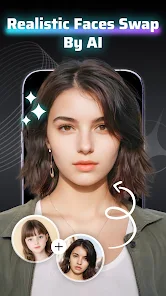

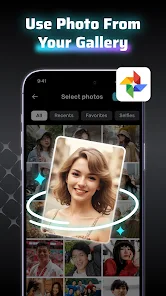
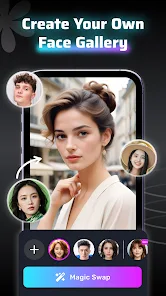
editor reviews
I came across AI Face Swap: MagicFace &Photo on the Google Play Store, and honestly, it sits right in that odd category of entertainment apps that feel more like a gimmick than a tool you actually need. It's basically a face-swapping app, which isn't anything new, but the idea of swapping faces in photos and videos quickly caught my attention when I was looking for something fun to mess around with during a lazy weekend. It had a decent number of installs, and the first impression after launching it was that the interface screamed clutter. There were buttons everywhere suggesting swaps, filters, and edits, and it felt like the app was trying way too hard to impress from the get-go.
Diving into the actual hands-on experience, onboarding was pretty straightforward but not exactly polished. The app asked for camera and photo permissions right away, which is expected, but the main screen had a big "Start" button that just dumps you into the camera view. I tried swapping faces with a friend in a photo, and the process was surprisingly simple: pick a face from the gallery, then let the app detect and replace it. The results were hit or miss though. Sometimes the blend looked natural, other times the shadowing was off, making the swapped face look like a cheap sticker. There's a small tip I picked up: keep the lighting consistent between the source and target face, or you'll end up with laughably mismatched skin tones. The app also has video swap options, but those took ages to process and made my phone pretty warm.
After a few days of occasional use, I can say it's good for a quick laugh but not something you'd rely on for any serious editing. People who want to prank their friends or make funny social media posts will probably enjoy it for a few minutes, but anyone used to tools like FaceApp will find this one lacking in polish and precision. It's different because it offers both photo and video swaps in one place, but that versatility doesn't save it from feeling incomplete. I ended up uninstalling it because the sheer number of ads popping up after every single swap got on my nerves, and the results just weren't consistent enough to justify keeping it around.
features
- 🔀 Face Swap in Photos – You can easily pick a face from one image and paste it onto another. The detection is quick, but the alignment sometimes fights against weird angles. Compared to Reface, which does this with way more polish, MagicFace feels a bit rougher around the edges but still gets the job done for casual use.
- 🎥 Video Face Swap – This lets you swap faces in short clips, which is a feature that sounds cool but takes forever to process. Reface does real-time swaps that look more natural, while MagicFace makes you wait and the final output often has that flickering effect around the edges of the swapped area.
- ✨ Filter and Edit Tools – The app throws in a bunch of filters and basic editing options like brightness adjustments. These feel tacked on compared to dedicated photo editors like Snapseed. They're not terrible, but they don't enhance the swap quality or save you from needing another app to fix the final look.
pros
- 💡 No Watermark on Free Version – Unlike FaceApp which slaps a big logo on your results unless you pay, MagicFace lets you save swapped images without any watermark right from the start. That's a huge plus if you just want to share a goofy picture with friends without the app advertising itself.
- 💡 Lightweight Download – The app isn't bloated like some other face swappers that pack in games or chatbots. It stays focused on swapping, so installing it doesn't hog much storage. It's more straightforward compared to apps like Snapchat which come with a whole social platform attached.
- 💡 No Account Needed – You can start swapping without signing up for anything. That's refreshing compared to Zao, which forces you to create an account and connect social media. MagicFace just lets you jump straight into the fun with zero commitment.
cons
- ❌ Aggressive Ads – Every time you finish a swap, a full-screen video ad pops up, sometimes with no skip button for five seconds. It's way more intrusive than Reface, which throws in smaller banner ads that don't block your workflow as much.
- ❌ Inconsistent Swap Quality – The face detection fails in low light or when faces are partially turned. FaceApp handles these scenarios much better, detecting faces even in profile shots. MagicFace often just gives up and tells you no face was found.
- ❌ Slow Video Processing – Swapping faces in a 10-second clip took nearly two minutes on my device. In comparison, Reface processes real-time swaps almost instantly. This lag makes video swapping feel more like a burden than a feature.
- ❌ No Subscription Option – You only get limited swaps without paying per use. Snapchat's face swap lens is free completely, while MagicFace pushes you into a pay-per-feature model that feels outdated and restrictive over time.
Recommended Apps
![]()
Phone Tracker - Phone Locator
Lutech Ltd4.1
![]()
Cartoon Photo Editor
AZ Mobile Software4.5
![]()
Speak to Santa™ - Video Call
North Pole Command Centre Limited4.4![]()
Gay Dating & LGBT Hookup App
Hookup Apps to Hook up Local Dating4.5![]()
Wonder - AI Art Generator
Codeway Dijital3.7![]()
Shazam: Find Music & Concerts
Apple Inc.4.8![]()
Lightroom Photo & Video Editor
Adobe4.5![]()
Crush Love Tester
A.L Studio3.7![]()
Daily Horoscope
Horoscope by Comitic4.8![]()
Kissing Test Calculator
We Love pranks3![]()
Filters for pictures - FaceArt
VysionApps2.8![]()
Pinterest
Pinterest4.5![]()
QR Code Reader Barcode Scanner
Celebrity App Studio3.9![]()
PicSo – Customize Your AI Girl
Meta Insight3.7![]()
Does He Like Me?
KDR Games4.3















Disclaimer
1.AppInfoLibrary does not represent any developer, nor is it the developer of any App or game.
2.AppInfoLibrary provide custom reviews of Apps written by our own reviewers, and detailed information of these Apps, such as developer contacts, ratings and screenshots.
3.All trademarks, registered trademarks, product names and company names or logos appearing on the site are the property of their respective owners.
4. AppInfoLibrary abides by the federal Digital Millennium Copyright Act (DMCA) by responding to notices of alleged infringement that complies with the DMCA and other applicable laws.
5.If you are the owner or copyright representative and want to delete your information, please contact us info@appinfolibrary.com.
6.All the information on this website is strictly observed all the terms and conditions of Google Ads Advertising policies and Google Unwanted Software policy .