

AI Art Photo Editor, AI Filter

5M+
Installs
Smart AI DEV
Developer
-
Generative AI
Category
-
Rated for 3+
Content Rating
-
summerdaysc@outlook.com
Developer Email
-
https://coolsummerdev.com/avatar-privacy-policy
Privacy Policy
Screenshots

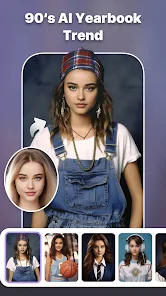
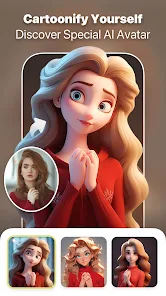

editor reviews
AI Art Photo Editor, built by Smart AI DEV, is one of those photo transformation tools that promise to turn your snapshots into something more stylized. It's a utility app in the image editing category with a heavy focus on applying AI-driven filters and artistic effects. A lot of casual users download it from Google Play or the App Store—it's free to install and has a decent install count, though exact numbers are hard to pin down. When you first open it, there's no lengthy tutorial; you're dropped right into a camera roll picker. It feels straightforward and a little basic, but that's fine for someone who just wants a quick edit without signing up or paying upfront. Registration isn't forced, though in-app purchases and occasional ads pop up if you want the full set of tools.
Once you start using the app, the interface feels plain but functional. The onboarding is minimal—choose a photo, wait a few seconds while it processes, and then a grid of style previews shows up. You'll tap around to see different filters, each labeled with a genre like anime, oil painting, or comic. The main actions are simple: pick a filter, confirm, and save. There's no slider for intensity or brush for selective areas, which can feel limiting if you're used to finer controls. The processing speed is decent on newer phones, but it hangs briefly on larger images. A small tip: the free filters rotate weekly, so check back if you're not ready to pay. The lack of an undo button is annoying—you'll find yourself reshooting just to try another style.
After spending some time with it, I think this app is great for someone who wants a quick, one-tap artistic effect and doesn't care about manual editing. People who enjoy sharing stylized portraits or landscapes on social media will probably keep it installed for occasional use. But if you're after serious photo editing controls or high-resolution exports, you'll be better off with something like Picsart or Lensa, which offer both AI filters and manual tools. What sets this app apart is how fast and simple it is—no learning curve, no cluttered menu. That said, you might uninstall it after a few uses if the filter variety feels repetitive. It's a decent tool for a specific purpose, not a replacement for a full editing suite.
features
- 😊 One-tap filter application: The entire editing process is essentially pick a photo, pick a filter, and wait. It cuts out all the sliders and layers you would find in Adobe Photoshop Express or Picsart, which is great if you want a fast result without learning anything.
- 😊 Genre-based filter categories: Instead of generic names like “vintage” or “warm,” the app labels filters by artistic style—anime, watercolor, sketch. This makes it easier to guess the outcome, whereas in YouCam Perfect you often have to test several filters to get a specific look.
- 😊 No mandatory account creation: You can download, use, and share results without signing up. That's a distinct advantage over apps like Prisma, which now requires you to create an account even for basic usage. It feels more respectful of your privacy.
pros
- 👍 Speed over settings: The biggest strength is how fast it processes images compared to Lensa, which takes noticeably longer on the same network. You get your edited photo in seconds instead of waiting through a queue.
- 👍 Free-to-use core: The basic filters are genuinely free without a subscription wall. Picsart now hides many of its AI tools behind a premium tier, so this app feels more generous even with its ad breaks.
- 👍 Straightforward UX: There is no excessive onboarding or tutorial screens. You open it, and it works. YouCam Perfect, on the other hand, pushes you into a reward system and extra features before you can even take a photo.
cons
- 👎 No intensity control: Unlike Remini or FaceApp, you cannot adjust how strong the filter effect is. What you see is what you get, and often it is too sharp or washed out without any way to fine-tune it.
- 👎 Limited free filter rotation: After a week, you'll have seen most free styles. The app heavily pushes in-app purchases for new packs, whereas Picsart offers a larger free filter library without rotating them out.
- 👎 No manual editing tools: If you want to crop, adjust brightness, or remove an object, you'll need a second app. Lensa and YouCam Perfect both include basic editing alongside AI filters, so this app feels incomplete by comparison.
Recommended Apps
![]()
Phone Tracker - Phone Locator
Lutech Ltd4.1
![]()
Cartoon Photo Editor
AZ Mobile Software4.5
![]()
Speak to Santa™ - Video Call
North Pole Command Centre Limited4.4![]()
Gay Dating & LGBT Hookup App
Hookup Apps to Hook up Local Dating4.5![]()
Wonder - AI Art Generator
Codeway Dijital3.7![]()
Shazam: Find Music & Concerts
Apple Inc.4.8![]()
Lightroom Photo & Video Editor
Adobe4.5![]()
Crush Love Tester
A.L Studio3.7![]()
Daily Horoscope
Horoscope by Comitic4.8![]()
Kissing Test Calculator
We Love pranks3![]()
Filters for pictures - FaceArt
VysionApps2.8![]()
Pinterest
Pinterest4.5![]()
QR Code Reader Barcode Scanner
Celebrity App Studio3.9![]()
PicSo – Customize Your AI Girl
Meta Insight3.7![]()
Does He Like Me?
KDR Games4.3















Disclaimer
1.AppInfoLibrary does not represent any developer, nor is it the developer of any App or game.
2.AppInfoLibrary provide custom reviews of Apps written by our own reviewers, and detailed information of these Apps, such as developer contacts, ratings and screenshots.
3.All trademarks, registered trademarks, product names and company names or logos appearing on the site are the property of their respective owners.
4. AppInfoLibrary abides by the federal Digital Millennium Copyright Act (DMCA) by responding to notices of alleged infringement that complies with the DMCA and other applicable laws.
5.If you are the owner or copyright representative and want to delete your information, please contact us info@appinfolibrary.com.
6.All the information on this website is strictly observed all the terms and conditions of Google Ads Advertising policies and Google Unwanted Software policy .




























