Girly Lock Screen Wallpaper

10M+
Installs
Prometheus Interactive LLC
Developer
-
Productivity
Category
-
Rated for 3+
Content Rating
-
support.girlylockscreen@zipoapps.com
Developer Email
-
https://zipoapps.com/girlylockscreen/privacy
Privacy Policy
Screenshots
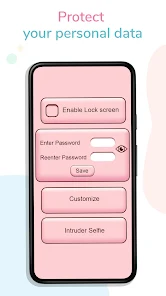
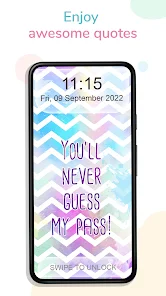
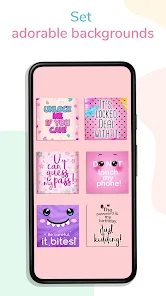
editor reviews
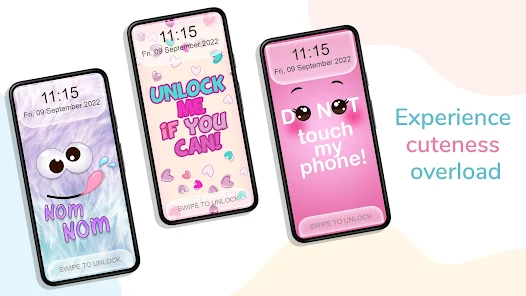
Girly Lock Screen Wallpaper, from Prometheus Interactive LLC, is essentially a customization tool for your phone's lock screen. You download it from the App Store or Google Play, install it, and once you launch the app, you're greeted with hundreds of wallpapers that fit that “girly” aesthetic—think pastels, florals, glitter, kawaii characters, and inspirational quotes with cursive fonts. The install count is decent for a niche app, and it's free to download, though you'll spot a small “Subscribe” button in the top corner right away. My first impression was that it's a bit cluttered visually, but the sheer variety of wallpapers makes it easy to see why someone would want this on their phone. No registration is required to browse, which is a nice touch for a quick setup.
When you start using it, the interface feels like a giant digital sticker book. After the initial splash screen, you're dropped into categories like “Pink,” “Cute Animals,” and “Aesthetic.” Tapping a wallpaper preview gives you a close-up look, and then you hit “Set as Wallpaper.” The app walks you through a few steps—adjusting the image to fit your screen, cropping it, and then confirming. I found the cropping tool a little finicky because it sometimes snaps to a weird ratio, but it gets the job done after a few tries. There are also “Daily” and “Trending” tabs that refresh often, so you're not stuck scrolling through the same 50 images. A small but useful tip: favoriting a wallpaper saves it to a private collection, which saves time later if you're indecisive like me. The app runs smoothly overall, though occasionally I noticed a slight lag when switching between heavy image files.
After a few weeks of using Girly Lock Screen Wallpaper, I can say it's a solid pick if you're really into changing your lock screen frequently and have a soft spot for floral patterns or pastel designs. It's less practical for someone who just wants a one-and-done wallpaper from their camera roll, since the free version shows ads every few swipes. Compared to apps like Vellum or Zedge, which offer broader categories and more customization, this one feels laser-focused on a specific aesthetic. What makes it stand out is the sheer density of girly themes—there's almost too much choice, but that's the point. I'd keep it installed because it's a fun way to refresh my home screen mood, but I can see others uninstalling it if they get tired of the ads or find the subscription push annoying.
features
- 🎀 Extensive collection of girly wallpapers: This app really hones in on a specific aesthetic with hundreds of options ranging from pastel gradients to glittery unicorns. In contrast, Vellum focuses more on clean, professional photography, which can feel too serious for some. Here, you'll find nothing but soft, cutesy, and feminine designs, which is a niche that's often underrepresented in mainstream wallpaper apps.
- 🎀 Daily updated content: There's a constant stream of new wallpapers added daily, so you rarely see the same old sets. Zedge, for instance, updates often too, but it mixes in live wallpapers and ringtones, which dilutes the visual focus. Girly Lock Screen Wallpaper keeps its eye on the prize, making the daily scroll feel fresh without distractions.
- 🎀 Favorites system for easy access: The ability to bookmark wallpapers into a “Favorites” folder is simple but practical. You can build a quick mood board without manually downloading everything. Other apps like Backgrounds HD have similar features, but the organization here feels more intuitive for someone who likes to switch looks multiple times a week.
pros
- 🌈 User-friendly interface for quick changes: The app is designed so you can go from opening it to having a new wallpaper in under a minute. CocoPPa, a similar app, makes you navigate through pop-up ads and menus, while this one strips that down. The straightforward cropping and setting steps eliminate clutter, making it easy even for non-techy users.
- 🌈 No forced registration: You can browse and set wallpapers without creating an account. Apps like Walli require sign-ins to save favorites, which feels annoying when you just want to try it out. Here, privacy isn't compromised, and you're not bombarded with email prompts upfront.
cons
- 🌧️ Ads can be intrusive during browsing: A pop-up ad appears after viewing roughly every third wallpaper, which disrupts the flow. In comparison, Zedge shows fewer ads and places them more discreetly at the bottom of the screen. You can pay to remove them, but for a free user, it's a constant irritation.
- 🌧️ Limited customization beyond wallpapers: There's no widget integration or icon pack support like you'd find in apps such as X Launcher. If you want a fully themed phone, this app only handles the lock screen, leaving your home screen mismatched.
- 🌧️ Cropping tool can be imprecise: The auto-crop feature sometimes cuts off crucial parts of an image, especially panoramic backgrounds. Vellum's scaling tool is smoother, allowing manual tweaks without snapping to awkward ratios.
Recommended Apps
![]()
Sider AI: All-in-One Companion
Vidline Inc.4.9

![]()
MyHeritage: Family Tree & DNA
MyHeritage.com4.3![]()
Love Frame - Romantic Couple P
ClickLab Technology4.1![]()
Future Self - Old Age Filter
Vidler Koiter1.6![]()
Pencil Sketch
Dumpling Sandwich Software Inc.4.7![]()
Volume Control Sound Launcher
AtomApplications4.4![]()
Hair Color Changer: Change you
Face & Body Tune Photo Editor SRL3.3![]()
Daily Horoscope
KADO Apps4.2![]()
Cute Wallpapers Cool Wallpaper
DevTeamIn20200![]()
PhotoFunia
Capsule Digital4.7![]()
PayPal - Send, Shop, Manage
PayPal Mobile4.3![]()
Yelp: Food, Delivery & Reviews
Yelp, Inc4.6![]()
Voice Changer - Voice Effects
Dairy App & Notes & Audio Editor & Voice Recorder4.4![]()
Planner 5D: Home Design, Decor
Planner 5D3.8![]()
Fingerprint Scanner Personalit
Zabirko4.3










Disclaimer
1.AppInfoLibrary does not represent any developer, nor is it the developer of any App or game.
2.AppInfoLibrary provide custom reviews of Apps written by our own reviewers, and detailed information of these Apps, such as developer contacts, ratings and screenshots.
3.All trademarks, registered trademarks, product names and company names or logos appearing on the site are the property of their respective owners.
4. AppInfoLibrary abides by the federal Digital Millennium Copyright Act (DMCA) by responding to notices of alleged infringement that complies with the DMCA and other applicable laws.
5.If you are the owner or copyright representative and want to delete your information, please contact us info@appinfolibrary.com.
6.All the information on this website is strictly observed all the terms and conditions of Google Ads Advertising policies and Google Unwanted Software policy .