
PRANK DIAL - Prank Call App

1M+
Installs
Lavalsoft
Developer
-
Entertainment
Category
-
Rated for 12+
Content Rating
-
support@prankdial.com
Developer Email
-
https://www.prankdial.com/privacy
Privacy Policy
Screenshots
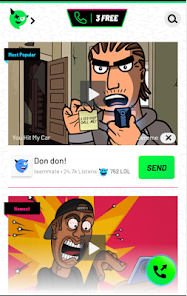
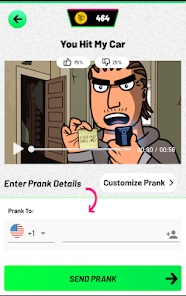
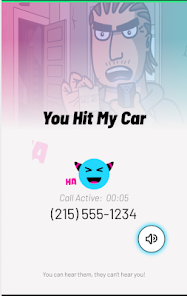
editor reviews
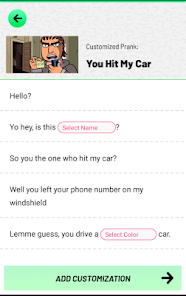
PRANK DIAL is a prank call simulation app from developer Lavalsoft, designed for people who want to pull off believable fake phone calls for laughs or to get out of awkward situations. You download it from the Google Play Store, and it's free to install, though I noticed it has some in-app purchases and occasional ads. The first impression after launching is pretty straightforward—a simple interface with a few preset prank scenarios and a big red dial button. It doesn't try to be fancy, which is fine, but you do wonder if the calls will actually sound real enough to fool anyone.
Using PRANK DIAL feels a bit like using a basic voice call app, but the twist is that the person on the other end is a pre-recorded actor. You pick a scenario, like "angry boss" or "overly friendly neighbor," and hit dial. The call connects, and the actor starts talking based on the prank you chose. What surprised me is that the voices actually sound pretty natural, not robotic, and the conversations have enough pauses to feel real. The interface is minimal, so you swipe left and right between different prank packs. Some packs are free, but the better ones are locked behind a purchase. One tip: the "fake taxi" one got genuine laughs from my friends, so that might be a good starting point.
After using PRANK DIAL for a few days, I think it's a fun little distraction, but definitely not for everyone. If you enjoy practical jokes or need a quick icebreaker at a party, you'll probably get a kick out of it. On the flip side, if you hate pranks or awkward silences, just skip it. Compared to something like Zuzu's prank calls, PRANK DIAL has fewer free options but better voice acting in the paid ones. It's not the kind of app I'd keep on my phone for weeks, but it's fun to show people once. Uninstall it after a few uses unless you really want to buy more scenarios.
features
- : The voice actors are genuinely good, with natural flow and realistic pauses, making the pranks feel less scripted than similar apps from lesser-known developers.
- : The scenarios cover everyday situations like "angry ex" or "wrong number," which are easy to use quickly without explaining anything to your targets.
- : The call interface mimics a real phone call closely, including a dial tone, so anyone watching won't realize it's a prank app unless they look at the screen.
- : The free version includes enough starter packs to test the quality, which is more generous than many competing prank call apps that lock everything behind a paywall.
pros
- : The voice acting feels more natural than in Cheap Pranks or Prank Caller 2, which often sound like someone reading from a script without emotion.
- : The call simulation includes background sounds like office chatter or traffic, adding realism that Zuzu's prank calls don't bother with.
- : Multiple scenarios per pack give variety, whereas some similar apps only offer one call idea per purchase, making this one better value for the money.
- : The interface is clean and intuitive compared to other forgotten prank apps that clutter the screen with confusing buttons.
cons
- : The free version severely limits how many calls you can make per day, which is restrictive compared to Zuzu's prank calls that let you try more before paying.
- : Some scenarios feel outdated, like the "landline repair" prank, which younger people won't find funny or relatable at all.
- : You can't easily customize the caller's name or number, so anyone who checks their phone might see a fake ID and get suspicious immediately.
- : The app shows video ads after certain calls even when used offline, which is annoying and not present in Prank Caller 2's free tier.
Recommended Apps
![]()
Phone Tracker - Phone Locator
Lutech Ltd4.1
![]()
Cartoon Photo Editor
AZ Mobile Software4.5
![]()
Speak to Santa™ - Video Call
North Pole Command Centre Limited4.4![]()
Gay Dating & LGBT Hookup App
Hookup Apps to Hook up Local Dating4.5![]()
Wonder - AI Art Generator
Codeway Dijital3.7![]()
Shazam: Find Music & Concerts
Apple Inc.4.8![]()
Lightroom Photo & Video Editor
Adobe4.5![]()
Crush Love Tester
A.L Studio3.7![]()
Daily Horoscope
Horoscope by Comitic4.8![]()
Kissing Test Calculator
We Love pranks3![]()
Filters for pictures - FaceArt
VysionApps2.8![]()
Pinterest
Pinterest4.5![]()
QR Code Reader Barcode Scanner
Celebrity App Studio3.9![]()
PicSo – Customize Your AI Girl
Meta Insight3.7![]()
Does He Like Me?
KDR Games4.3













Disclaimer
1.AppInfoLibrary does not represent any developer, nor is it the developer of any App or game.
2.AppInfoLibrary provide custom reviews of Apps written by our own reviewers, and detailed information of these Apps, such as developer contacts, ratings and screenshots.
3.All trademarks, registered trademarks, product names and company names or logos appearing on the site are the property of their respective owners.
4. AppInfoLibrary abides by the federal Digital Millennium Copyright Act (DMCA) by responding to notices of alleged infringement that complies with the DMCA and other applicable laws.
5.If you are the owner or copyright representative and want to delete your information, please contact us info@appinfolibrary.com.
6.All the information on this website is strictly observed all the terms and conditions of Google Ads Advertising policies and Google Unwanted Software policy .





























