To Do List

10M+
Installs
Splend Apps
Developer
-
Productivity
Category
-
Everyone
Content Rating
-
support@splendapps.com
Developer Email
-
https://splendapps.com/privacy
Privacy Policy
Screenshots
editor reviews
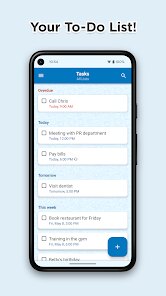
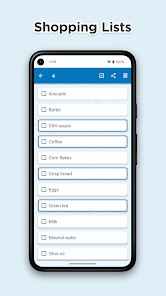
To Do List by Splend Apps is a straightforward productivity tool you'd grab from Google Play or the App Store to keep your daily tasks in check. It's a simple checklist app at heart, meant for anyone who jots down reminders, grocery lists, or work deadlines and wants a clean space to manage them without all the extra noise. I downloaded it after seeing it had a decent number of installs and was free to start, no forced sign-up right away. The first launch gave me a plain white interface with a big plus button at the bottom, which felt welcoming because there was no tutorial or nagging pop-up about upgrades. You just tap and start typing, which is exactly what I wanted after deleting a few apps that overcomplicated things with projects and tags before I even added a single item.
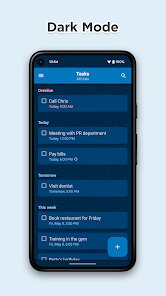
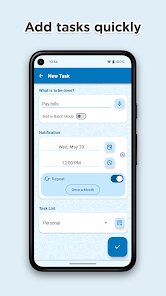
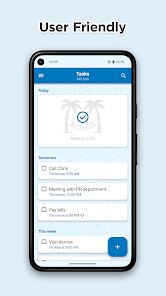
Once I started using it, the experience stayed simple. You tap that plus button, write something like “buy milk,” and hit save—it lands on your list with a checkbox. You can set a due date if you tap on the task again, and a small calendar pops up to pick the day. Swiping left on a task deletes it, and swiping right marks it done, which felt smooth after a day of testing. The interface stays minimal, with no tabs or folders to get lost in, so moving through it is just adding, checking, or removing. I did notice there is no search bar, so if you have twenty or thirty tasks, you have to scroll manually to find the old ones. Also, there is a tiny banner ad at the bottom, but it never covered any buttons or got in the way during my regular use. A nice touch was how quickly the app opened and let me type—no loading spinner, just instant action.
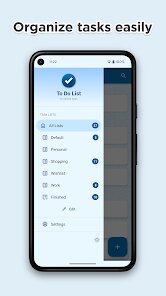
After a couple of weeks, I can say this app fits people who want a no-fuss list maker without learning curves or subscriptions. I kept it installed because it does exactly what a basic task app should, nothing more. Compared to something like Microsoft To Do or TickTick, this one lacks any smart lists, recurring tasks, or sync across devices, so if you juggle work and home lists or need reminders to repeat weekly, you might outgrow it fast. But for someone who just needs a quick private list for groceries or errands, it feels lighter and more direct than those bigger apps. The absence of account creation means your data sits only on your phone, which some might see as a privacy win, though losing everything if you switch phones is a real risk. I could see someone uninstalling it if they start needing collaboration or cloud backups, but for my casual use, the simplicity is what keeps me from deleting it.
features
- 📝 Straightforward task entry: You tap the plus button and type your item, with no extra fields or categories to fill, which makes adding tasks as fast as writing on paper.
- 👍 Swipe gestures for actions: A left swipe deletes a task, and a right swipe marks it complete, so you can manage your list with one hand without hunting for icons.
- 📅 Inline date picker: Tapping a task opens a small calendar to assign a due date, which is simpler than the multi-step process in apps like Todoist where you have to use natural language or open separate menus.
- 🚫 No account required: You can start using it immediately without registering, unlike TickTick or Microsoft To Do that prompt for sign-in before you can really get going.
pros
- 🆓 Completely free core experience: Unlike Todoist which locks smart labels and reminders behind a paid plan, this app gives you full access to basic task creation and due dates without asking for a dime.
- ⚡ Instant launch and response: The app opens in under a second on my older phone, and every tap registers without lag, beating apps like Any.do that sometimes stutter when loading lists with many items.
- 📱 Minimal battery and memory usage: Because it stores everything locally and has no background sync, it sips resources compared to Microsoft To Do which runs constant cloud checks.
cons
- 🔄 No cloud backup or sync: If you lose your phone or get a new one, all your tasks vanish, while apps like TickTick and Google Keep let you restore everything across devices seamlessly.
- 🔍 No search function: Once your list grows past twenty items, you have to scroll manually to find old tasks, a feature that even simple apps like Google Tasks includes.
- ⏰ No reminders or notifications: You can set a due date, but the app never alerts you, so it falls behind tools like Microsoft To Do which send timely push notifications to keep you on track.
Recommended Apps
![]()
Sider AI: All-in-One Companion
Vidline Inc.4.9

![]()
MyHeritage: Family Tree & DNA
MyHeritage.com4.3![]()
Love Frame - Romantic Couple P
ClickLab Technology4.1![]()
Future Self - Old Age Filter
Vidler Koiter1.6![]()
Pencil Sketch
Dumpling Sandwich Software Inc.4.7![]()
Volume Control Sound Launcher
AtomApplications4.4![]()
Hair Color Changer: Change you
Face & Body Tune Photo Editor SRL3.3![]()
Daily Horoscope
KADO Apps4.2![]()
Cute Wallpapers Cool Wallpaper
DevTeamIn20200![]()
PhotoFunia
Capsule Digital4.7![]()
PayPal - Send, Shop, Manage
PayPal Mobile4.3![]()
Yelp: Food, Delivery & Reviews
Yelp, Inc4.6![]()
Voice Changer - Voice Effects
Dairy App & Notes & Audio Editor & Voice Recorder4.4![]()
Planner 5D: Home Design, Decor
Planner 5D3.8![]()
Fingerprint Scanner Personalit
Zabirko4.3














Disclaimer
1.AppInfoLibrary does not represent any developer, nor is it the developer of any App or game.
2.AppInfoLibrary provide custom reviews of Apps written by our own reviewers, and detailed information of these Apps, such as developer contacts, ratings and screenshots.
3.All trademarks, registered trademarks, product names and company names or logos appearing on the site are the property of their respective owners.
4. AppInfoLibrary abides by the federal Digital Millennium Copyright Act (DMCA) by responding to notices of alleged infringement that complies with the DMCA and other applicable laws.
5.If you are the owner or copyright representative and want to delete your information, please contact us info@appinfolibrary.com.
6.All the information on this website is strictly observed all the terms and conditions of Google Ads Advertising policies and Google Unwanted Software policy .