ToonArt: Cartoon Yourself

10M+
Installs
Lyrebird Studio
Developer
-
Video Players & Editors
Category
-
Rated for 3+
Content Rating
-
lyrebirdstudio@gmail.com
Developer Email
-
https://lyrebirdstudio.net/privacy_policy.htm
Privacy Policy
Screenshots
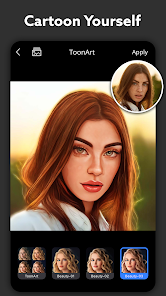
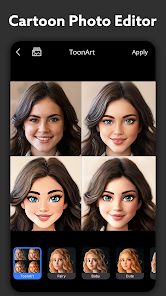
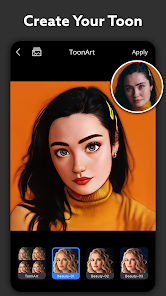
editor reviews
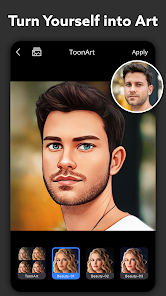
ToonArt is a photo editing app that turns your regular selfies into cartoon-style portraits, illustrations, and sketches. It falls squarely into the fun photo filter category, sitting alongside apps like Meitu or Picsart but with a laser focus on the cartoon effect. You mainly use it to upload a photo from your camera roll or take a new one, then pick a style—comic book, anime, 3D cartoon, pencil sketch—and let the app process it. Why would a regular person bother downloading it? Because everyone has that one profile picture they want to level up, or maybe they want to send a friend a goofy caricature without learning actual drawing software. The first impression after opening the app is decent: the interface is clean, the color scheme is bright, and the main button literally says "Cartoon Yourself" right there. You don't need to sign up immediately to test it, which is a nice relief. It's available on both Google Play and the App Store, free to download, with over 10 million installs on Android alone. But don't get too comfortable—there are in-app purchases and ads that pop up, especially after your first free transformation.
Actually using ToonArt is where the experience gets mixed. The onboarding is straightforward: you grant photo access, pick an image, and choose from maybe a dozen styles. The app processes the photo in about 10 to 20 seconds, which feels fine. The interface after that shows your cartoon version alongside the original, so you can compare. But here's the thing—the algorithm hit or miss. On a clear, front-facing selfie with good lighting, the output often looks crisp and genuinely stylized, like something from a webcomic. But if your photo has weird shadows, glasses, or a busy background, the face can come out distorted, with eyes looking lopsided or hair turning into a blurry mess. I found myself tapping the "retry" button a few times to get better results, which is annoying but not a dealbreaker. A small practical tip: use a photo where your face takes up at least half the frame, and avoid group shots. The app also offers background removal and some basic editing tools, but they feel tacked on and slow compared to the main cartoon feature.
After spending a few days with ToonArt, my final take is this: it's a fun gimmick for a quick laugh, but not something I see myself opening weekly. People who enjoy quirky profile pictures or want to surprise friends with a cartoon version of themselves will probably love it. But if you already use apps like Prisma or Meitu for more serious artistic filters, ToonArt might feel limited. What sets it apart from those is the sheer variety of cartoon styles—some apps only do one look, while this one gives you manga, 3D avatar, and comic book styles all at once. That said, the aggressive ads and the fact that most good styles are locked behind a premium subscription (around $7 weekly) make me want to uninstall it after the free trial. I ended up keeping it installed mostly because my friends kept asking me to cartoon their photos. But for daily use? Probably not.
features
- 🎨 One-tap cartoon transformation into multiple artistic styles like anime, comic, sketch, and 3D avatar.
- 🖼️ Background removal with automatic detection, which is handy for isolating your character from messy scenes.
- ⚡ Fast processing speed for a single face, rarely taking longer than 15 seconds on a good connection.
- 🧩 A "compare mode" that shows your original and cartoon version side by side, which is satisfying to share.
pros
- ✅ Compared to Meitu, ToonArt offers a wider range of cartoon-specific styles without cluttering the interface with general beauty filters.
- ✅ The cartoon output actually looks like a different art form rather than just a heavy filter overlay, unlike many simpler apps.
- ✅ It works well even on slightly older phone models, and the app size is reasonable compared to bloated editing suites.
cons
- ❌ Inconsistent results on photos with glasses, side angles, or dim lighting, which is frustrating when you just want a quick cartoon face.
- ❌ Aggressive ads that appear after every export, way more intrusive than alternatives like Snapchat's cartoon lens.
- ❌ Almost all desirable styles are locked behind a pricey subscription, while Prisma lets you access more filters for free initially.
Recommended Apps
![]()
Phone Tracker - Phone Locator
Lutech Ltd4.1
![]()
Cartoon Photo Editor
AZ Mobile Software4.5
![]()
Speak to Santa™ - Video Call
North Pole Command Centre Limited4.4![]()
Gay Dating & LGBT Hookup App
Hookup Apps to Hook up Local Dating4.5![]()
Wonder - AI Art Generator
Codeway Dijital3.7![]()
Shazam: Find Music & Concerts
Apple Inc.4.8![]()
Lightroom Photo & Video Editor
Adobe4.5![]()
Crush Love Tester
A.L Studio3.7![]()
Daily Horoscope
Horoscope by Comitic4.8![]()
Kissing Test Calculator
We Love pranks3![]()
Filters for pictures - FaceArt
VysionApps2.8![]()
Pinterest
Pinterest4.5![]()
QR Code Reader Barcode Scanner
Celebrity App Studio3.9![]()
PicSo – Customize Your AI Girl
Meta Insight3.7![]()
Does He Like Me?
KDR Games4.3















Disclaimer
1.AppInfoLibrary does not represent any developer, nor is it the developer of any App or game.
2.AppInfoLibrary provide custom reviews of Apps written by our own reviewers, and detailed information of these Apps, such as developer contacts, ratings and screenshots.
3.All trademarks, registered trademarks, product names and company names or logos appearing on the site are the property of their respective owners.
4. AppInfoLibrary abides by the federal Digital Millennium Copyright Act (DMCA) by responding to notices of alleged infringement that complies with the DMCA and other applicable laws.
5.If you are the owner or copyright representative and want to delete your information, please contact us info@appinfolibrary.com.
6.All the information on this website is strictly observed all the terms and conditions of Google Ads Advertising policies and Google Unwanted Software policy .