Wave Live Wallpapers Maker 3D

50M+
Installs
Live Wallpapers by Wave Studio
Developer
-
Productivity
Category
-
Rated for 7+
Content Rating
-
office@wavekeyboard.com
Developer Email
-
https://www.livewallpapers.com/privacy-policy.html
Privacy Policy
Screenshots

editor reviews
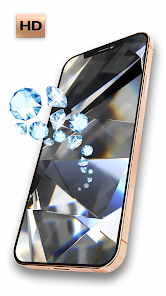
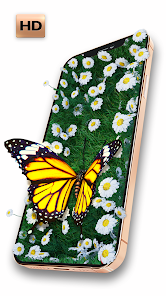
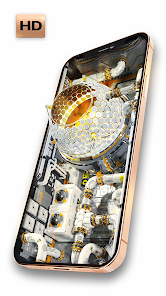
Wave Live Wallpapers Maker 3D is a customization tool from Live Wallpapers by Wave Studio that lets you turn your static phone screen into something that actually moves and reacts. It's basically a wallpaper app, but instead of just picking a preset, you can build your own animated backgrounds. I came across this on both Google Play and the App Store, and while the install counts are solid, it's one of those apps you grab on a whim when you're tired of your phone feeling the same every day. Right after launching, the first thing that hits you is the sheer showroom of colorful, flowing motion—waves, smoke, glowing rings—all moving in real time. It feels like demo mode on a TV at Best Buy, and that first impression screams, “Yeah, this is cooler than a static photo.”
Once you're inside, the experience is less about tweaking sliders and more about browsing presets that look polished out of the box. You pick a style, hit apply, and that's it—the screen comes alive. Some templates allow you to tweak the color palette or motion speed, but not every option gives you that freedom, which is a bit hit or miss. I remember adding a fluid wave wallpaper, and within seconds, the icons floated behind the ripples. That moment felt smooth. The onboarding is basically nonexistent, but you don't really need a tutorial because the main action is just tap and preview. If you want to make your own wallpaper from a photo, that path is hidden a few menus deep and honestly feels less intuitive. Most people will stick with the pre-made ones, and they'll be fine. One small thing I liked was the battery indicator preview—it tells you how much juice each wallpaper might drain, which is a thoughtful touch for people like me who worry about battery life.
After using it for a couple of weeks, I think this app is best for people who enjoy frequent visual changes on their phone and don't mind a bit of battery trade-off. If you want a set-and-forget wallpaper that's subtle, this app might feel too flashy or resource-heavy. Compared to something like Muzei or KLWP, Wave is far simpler—you get fewer customization controls but also way less setup time. I never felt the urge to uninstall it because the presets are genuinely fun to cycle through, and the app doesn't nag you with ads every time you switch. That said, the average user who just wants a clean, minimal wallpaper will probably skip this. It's made for those who want their phone to look like a tiny light show, and honestly, sometimes that's exactly what you need on a boring Tuesday.
features
- 🎨 You can build your own animated wallpaper by mixing different motion styles, colors, and speed settings. It's not just picking from a gallery—there's actual blending between water, smoke, and light effects that lets you end up with something no one else has. I'd say it stands above apps like Wallpaper Engine Mobile (which is great but PC-first) because Wave keeps the whole creation flow on your phone without needing a separate computer tool.
- 🌊 A huge chunk of the presets are 3D depth with real-time particle movement. Tilt your phone and the wallpaper shifts, almost like a hologram. Not many wallpaper apps push this kind of parallax without feeling laggy, and Wave handles it surprisingly well on mid-range phones too.
- ⚡ The app includes a battery impact meter for every wallpaper you preview. It's rare to see an app care about this upfront, and it honestly helps you decide if a super bright flow effect is worth the extra drain. Most competitors like Zedge or Kustom hide that information until you dig through settings.
pros
- ✅ The presets look professional and polished right out of the box. You don't need to become a designer to get a wallpaper that impresses people when you hand them your phone. Compared to live wallpaper apps like Kustom Live Wallpaper Maker, Wave saves you the learning curve big time.
- ✅ Battery impact indicators are built directly into the preview screen. That level of transparency is rare in wallpaper tools. Most apps just say “may affect battery life,” but Wave tells you exactly how much each style consumes.
- ✅ Smooth real-time 3D parallax even on mid-range devices. I've seen similar effects on apps like Live Wallpapers HD lag on older chipsets, but Wave remains fluid more consistently.
cons
- ❌ The custom creation mode is buried in the menu and unintuitive compared to the presets. If you want to build a wallpaper from scratch, apps like KLWP or Wallpaper Engine are far more capable and user-friendly for that specific purpose.
- ❌ Some templates don't allow any color or speed adjustments. You might find a perfect motion style, but if you hate the shade of blue it uses, you're stuck unless you pick another preset entirely.
- ❌ Free version runs occasional ads before applying a new wallpaper. It's not constant, but compared to apps like Muzei that are ad-free from the start, it's a small annoyance that will push some people toward the paid upgrade.
Recommended Apps
![]()
Sider AI: All-in-One Companion
Vidline Inc.4.9

![]()
MyHeritage: Family Tree & DNA
MyHeritage.com4.3![]()
Love Frame - Romantic Couple P
ClickLab Technology4.1![]()
Future Self - Old Age Filter
Vidler Koiter1.6![]()
Pencil Sketch
Dumpling Sandwich Software Inc.4.7![]()
Volume Control Sound Launcher
AtomApplications4.4![]()
Hair Color Changer: Change you
Face & Body Tune Photo Editor SRL3.3![]()
Daily Horoscope
KADO Apps4.2![]()
Cute Wallpapers Cool Wallpaper
DevTeamIn20200![]()
PhotoFunia
Capsule Digital4.7![]()
PayPal - Send, Shop, Manage
PayPal Mobile4.3![]()
Yelp: Food, Delivery & Reviews
Yelp, Inc4.6![]()
Voice Changer - Voice Effects
Dairy App & Notes & Audio Editor & Voice Recorder4.4![]()
Planner 5D: Home Design, Decor
Planner 5D3.8![]()
Fingerprint Scanner Personalit
Zabirko4.3













Disclaimer
1.AppInfoLibrary does not represent any developer, nor is it the developer of any App or game.
2.AppInfoLibrary provide custom reviews of Apps written by our own reviewers, and detailed information of these Apps, such as developer contacts, ratings and screenshots.
3.All trademarks, registered trademarks, product names and company names or logos appearing on the site are the property of their respective owners.
4. AppInfoLibrary abides by the federal Digital Millennium Copyright Act (DMCA) by responding to notices of alleged infringement that complies with the DMCA and other applicable laws.
5.If you are the owner or copyright representative and want to delete your information, please contact us info@appinfolibrary.com.
6.All the information on this website is strictly observed all the terms and conditions of Google Ads Advertising policies and Google Unwanted Software policy .