Move to iOS

100,000,000+
Installs
Apple
Developer
-
Productivity
Category
-
Rated for 3+
Content Rating
-
support@apple.com
Developer Email
-
http://www.apple.com/privacy/privacy-policy/
Privacy Policy
Screenshots

editor reviews
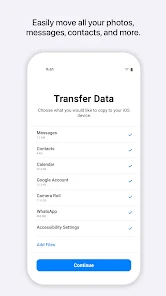
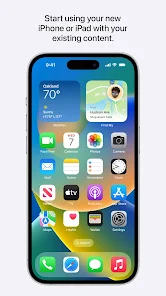
Move to iOS is a utility app made by Apple to help Android users shift all their stuff—contacts, messages, photos, videos, mail accounts, calendars, and even WhatsApp history—over to an iPhone or iPad. You'd download it from Google Play, and it's free with no registration or hidden costs. After installing, the first impression is pretty simple: a clean, uncluttered interface that asks for permissions right away, which feels straightforward. Most people grab this app because switching phones is a headache, and Apple wants to make the process less of a hassle. Opening it up, you're greeted with a code from your new iOS device, and it's clear there's not much to figure out—just tap through a few steps.
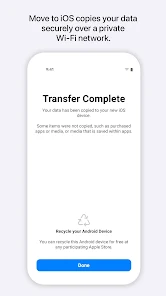
Using Move to iOS is a one-time event for most people, so the experience is short but purposeful. After launching, you pick what to transfer from your old Android phone—each category is checked by default, like photos or contacts. The interface is minimal, with a progress bar that shows how long the transfer will take. I found it smooth for smaller data sets, but larger transfers—say, over 20GB of photos—can feel slow, and you have to keep both phones plugged in and on the same Wi-Fi. One tip: make sure your Android has enough battery, because the process can drain it fast. The app guides you through each step without confusion, and there's a small pause when it scans your files, which feels normal. Overall, it gets the job done without much fuss.
After using Move to iOS, I'd say it's a solid tool for anyone switching to an iPhone for the first time, especially if you're not tech-savvy. It does exactly what Apple promises—no frills, no extra features—so it's not for folks who want to selectively transfer just a few items or skip the whole setup process. Compared to something like Samsung Smart Switch, which works both ways, Move to iOS is strictly one-directional: Android to iOS, and that's fine because it's designed for that purpose. What stands out is how secure it feels—everything goes through a direct Wi-Fi link, not the cloud—but if you're already using Google Drive or Dropbox, you might not need this app at all. I kept it installed only until the transfer finished, then uninstalled it. For a single-use tool, it does what it should, even if it's not exciting or powerful.
features
- 📲 Seamless Initial Setup: Move to iOS walks you through the whole switch in one shot, transferring contacts, messages, photos, and even WhatsApp chat history directly from your Android phone. In contrast, Samsung Smart Switch offers a similar feature but requires more manual steps for app data, giving Apple's app a slight edge in simplicity for first-time iPhone users.
- 📲 Secure Direct Transfer: Everything moves over a private Wi-Fi connection instead of the cloud, so your info doesn't touch third-party servers. Smart Switch also uses local transfers, but Move to iOS feels more locked-down because it's built by Apple and tied to iOS's setup wizard, reducing the chance of data leaks during the process.
- 📲 No Extra Bloatware: Unlike Smart Switch, which packs extra tools like backups or device management, Move to iOS is a bare-bones utility. It focuses solely on the setup phase, so you're not stuck with leftover features after the transfer—perfect for users who just want to move data and uninstall the app.
pros
- 👍 Straightforward Design: The app is incredibly simple—enter a code, pick your data, and wait for the transfer to finish. This is a clear win over Samsung Smart Switch, which sometimes confuses newbies with its dual transfer cable and Wi-Fi options.
- 👍 Free and No Ads: You don't need to pay a cent or deal with annoying pop-ups during the process. Google's Data Restore Tool for Android is also free, but Move to iOS feels cleaner because it's not buried in a larger settings menu.
- 👍 One-Time Focus: It doesn't try to do everything—just the switch itself. That's better than apps like MobileTrans, which sell paid versions with extras like phone cloning, because you don't pay for features you won't use after day one.
cons
- 👎 Limited to First Use: After the transfer, the app has no purpose—it can't sync future updates or manage existing data. Samsung Smart Switch is better here because it lets you back up and restore later, but Move to iOS is a one-shot deal.
- 👎 Slow with Large Files: Moving 30-40GB of photos or videos takes forever and eats up battery fast. Google Drive or OneDrive can handle this via cloud sync, which feels smoother despite requiring subscriptions for large storage.
- 👎 No Wireless Speed Control: Unlike Smart Switch, which sometimes shows transfer speeds, Move to iOS just gives a vague progress bar. You never know if it's stalled or just slow, which is frustrating when you're watching it crawl.
- 👎 Incompatible with Non-Apple Equipment: It won't work with Android tablets or Windows phones for setup—only iPads and iPhones. Third-party tools like Wondershare Dr.Fone support more device combos, making Move to iOS feel rigid for diverse households.
Recommended Apps
![]()
Sider AI: All-in-One Companion
Vidline Inc.4.9

![]()
MyHeritage: Family Tree & DNA
MyHeritage.com4.3![]()
Love Frame - Romantic Couple P
ClickLab Technology4.1![]()
Future Self - Old Age Filter
Vidler Koiter1.6![]()
Pencil Sketch
Dumpling Sandwich Software Inc.4.7![]()
Volume Control Sound Launcher
AtomApplications4.4![]()
Hair Color Changer: Change you
Face & Body Tune Photo Editor SRL3.3![]()
Daily Horoscope
KADO Apps4.2![]()
Cute Wallpapers Cool Wallpaper
DevTeamIn20200![]()
PhotoFunia
Capsule Digital4.7![]()
PayPal - Send, Shop, Manage
PayPal Mobile4.3![]()
Yelp: Food, Delivery & Reviews
Yelp, Inc4.6![]()
Voice Changer - Voice Effects
Dairy App & Notes & Audio Editor & Voice Recorder4.4![]()
Planner 5D: Home Design, Decor
Planner 5D3.8![]()
Fingerprint Scanner Personalit
Zabirko4.3















Disclaimer
1.AppInfoLibrary does not represent any developer, nor is it the developer of any App or game.
2.AppInfoLibrary provide custom reviews of Apps written by our own reviewers, and detailed information of these Apps, such as developer contacts, ratings and screenshots.
3.All trademarks, registered trademarks, product names and company names or logos appearing on the site are the property of their respective owners.
4. AppInfoLibrary abides by the federal Digital Millennium Copyright Act (DMCA) by responding to notices of alleged infringement that complies with the DMCA and other applicable laws.
5.If you are the owner or copyright representative and want to delete your information, please contact us info@appinfolibrary.com.
6.All the information on this website is strictly observed all the terms and conditions of Google Ads Advertising policies and Google Unwanted Software policy .